Community Services Tips
Tip #16
May 11, 2022
Subscribe to Forum Digest to get a selection of the latest discussions and notifications in your mailbox.
- Log in to your Vivaldi account.
- Go to https://forum.vivaldi.net/me/settings.
- Scroll down to the Email section.
- Choose how often you want to receive the Digest email. Choices are:
- Daily,
- Weekly,
- Bi-weekly,
- Monthly, and
- Off i.e. disabled.
- Click Save Changes.
The emails will be sent at the chosen interval to your account’s recovery email address.
Tip #9
May 2, 2022
Change the look of Vivaldi’s user interface with custom CSS modifications.
If you’re familiar with reading and writing code, you can edit the desktop browser’s user interface with your own custom CSS modifications.
To get started:
- In
vivaldi://experiments, enable “Allow for using CSS modifications”. - In Settings > Appearance > Custom UI Modifications, select the folder where you’ll store all your custom CSS files.
- Restart the browser.
Now you can start inspecting the user interface using Developer Tools, write up your own CSS for the elements you want to change and see the browser transform to fit your preferences even more.
Vivaldi Community shares and works on modifications together on the Forum’s Modifications category. Feel free to ask assistance and share your work there.
Important! Code shared on the forum has not been reviewed by the Vivaldi Team. Which means that issues, including security issues, may be present.
If you don’t want to risk corrupting your main browser profile, test your modifications in a different User Profile or use a Standalone version of Vivaldi.
Tip #7
April 28, 2022
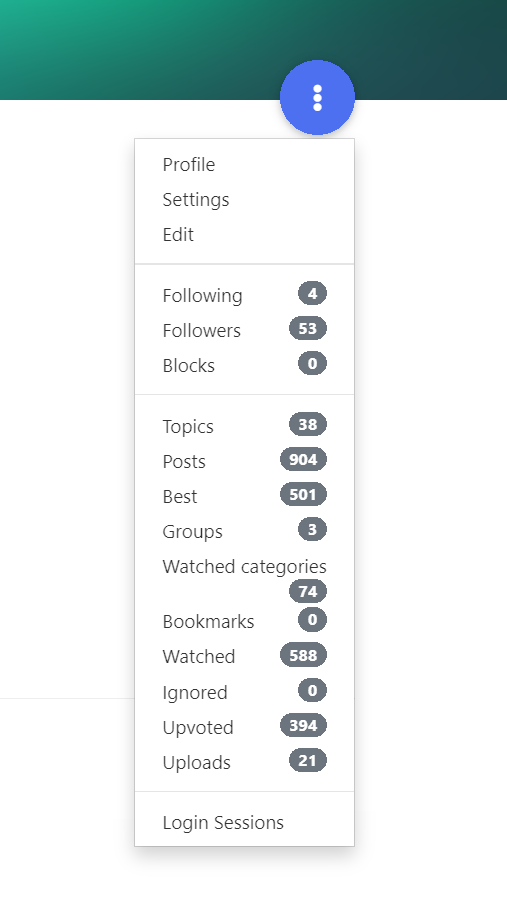
Click on the blue circle on your Forum profile to find all your content and followed posts.
When you go to your Vivaldi Forum profile on https://forum.vivaldi.net/me (or click on your profile image in the top right corner of the Forum and then on your username), you’ll find a 🔵 blue circle on the right side of the profile page.
Clicking on the button will open a menu with a lot of useful options. For example, you can see a list of all the discussions you’ve started (Topics) and comments you’ve made (Posts). Useful, when you’re looking for that one post you made ages ago.
In addition, you can manage the categories that you watch. Posts in the watched categories appear in the Unread and Recent sections of the Forum.
Tip #5
April 26, 2022
Keep your Vivaldi account’s recovery email up to date.
Normally, forgetting a login password is no big deal. You can just reset it. But what if you no longer have access to the account’s recovery email and the all important email with a link to set a new password can’t reach you? Then restoring access to your account becomes a hassle that could’ve been easily avoided.
In addition, you might miss other important emails from us. Such as announcements about upcoming maintenance work when using our services might temporarily not be possible, or about updates to the Privacy Policy and the like.
To review your Vivaldi account information, including the recovery email:
- Go to Vivaldi.net.
- Log in to your account.
- In the top right corner of the page, click on your username/avatar and select Profile.
- On the profile update the recovery email, if needed.
You’ll find step-by-step instructions for updating the account’s recovery email and other account info on Vivaldi Help.
PS! While you’re at it, check the recovery email of your other online accounts, especially those you created a long time ago.
Tip #3
April 22, 2022
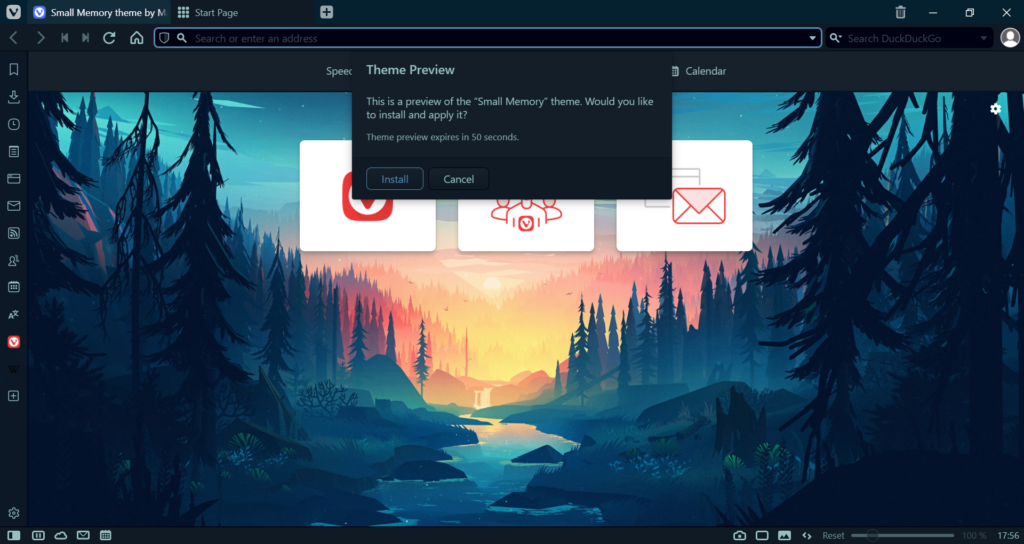
On Vivaldi Themes, click on “Download theme” to preview the theme before installing it.
When browsing themes.vivaldi.net for new Themes for your desktop Vivaldi browser, you can get a live preview of the theme by clicking “Download theme”.
Then you have 1 minute to see how the theme looks. Make sure to check the Start Page to see how the awesome background image looks behind your Speed Dials. Other places where the user interface colours are clearly visible are Panels, Settings, Mail, etc.
When you’re satisfied with the theme, click “Install” in the pop-up to add the theme to your Theme Library. If it’s not really what you were looking for, click “Cancel” or let the preview time run out.