Read this article in español, français, Deutsch, Русский, 日本語, Język polski.
Android: your tabs, your way, your data
Pin the tabs that matter
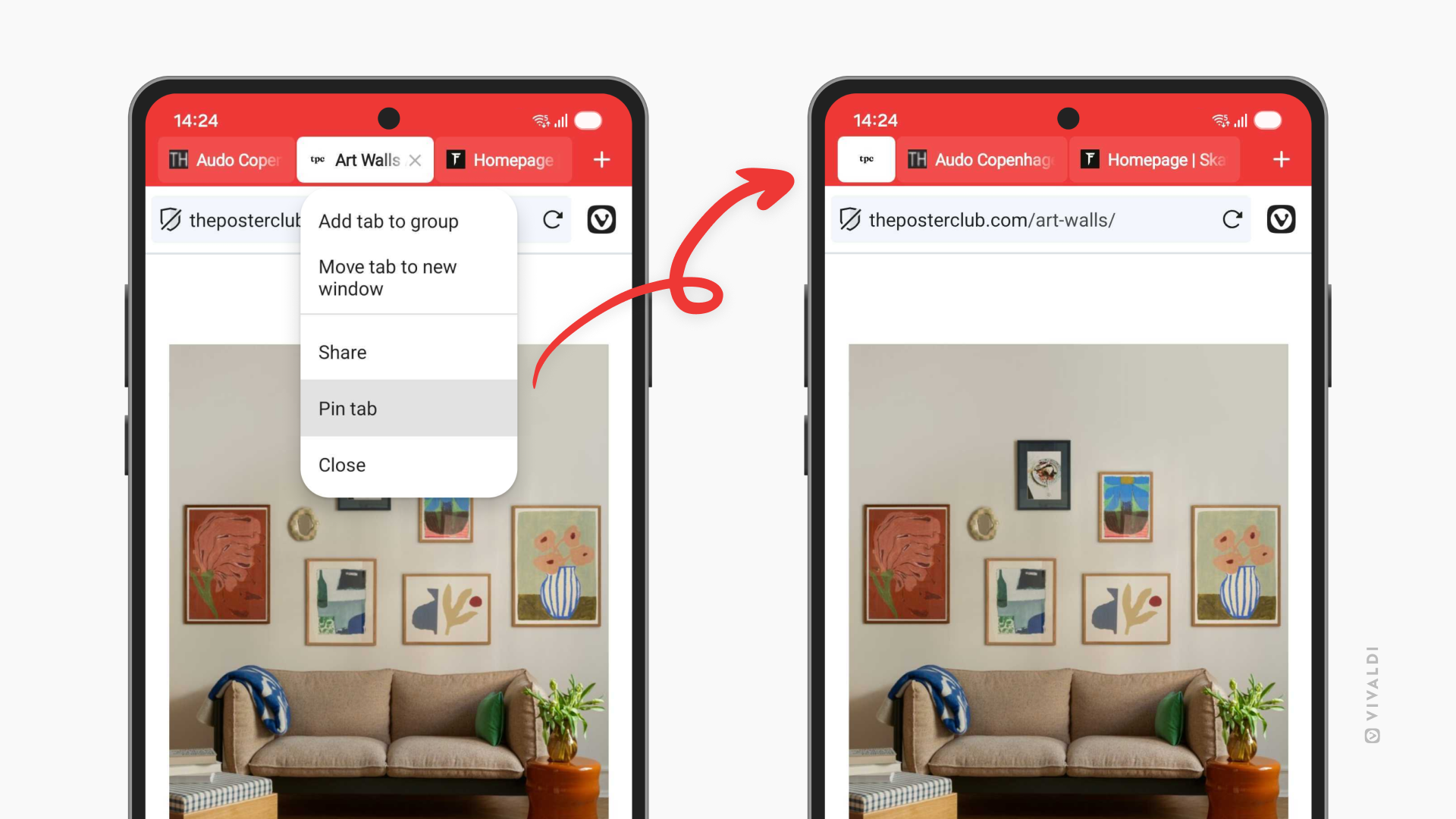
Pinned tabs have arrived on Vivaldi for Android. If you’ve been pinning tabs on Desktop you know why this matters. Some tabs deserve a special place in your Tab Bar. Your work dashboard. Your favorite news site. That recipe you’re perfecting. The tabs you return to throughout the day, every day.
Now you can pin them in place on your phone, keeping them within a finger’s reach. Long-press any tab and select “Pin Tab” to lock it at the start of your Tab Bar.
This is especially useful if you’re the kind of person who opens dozens of tabs throughout the day (no judgment). Pinned tabs give structure to your browsing chaos, keeping your essential tabs separate from the temporary ones.
See who’s watching (and stop them)
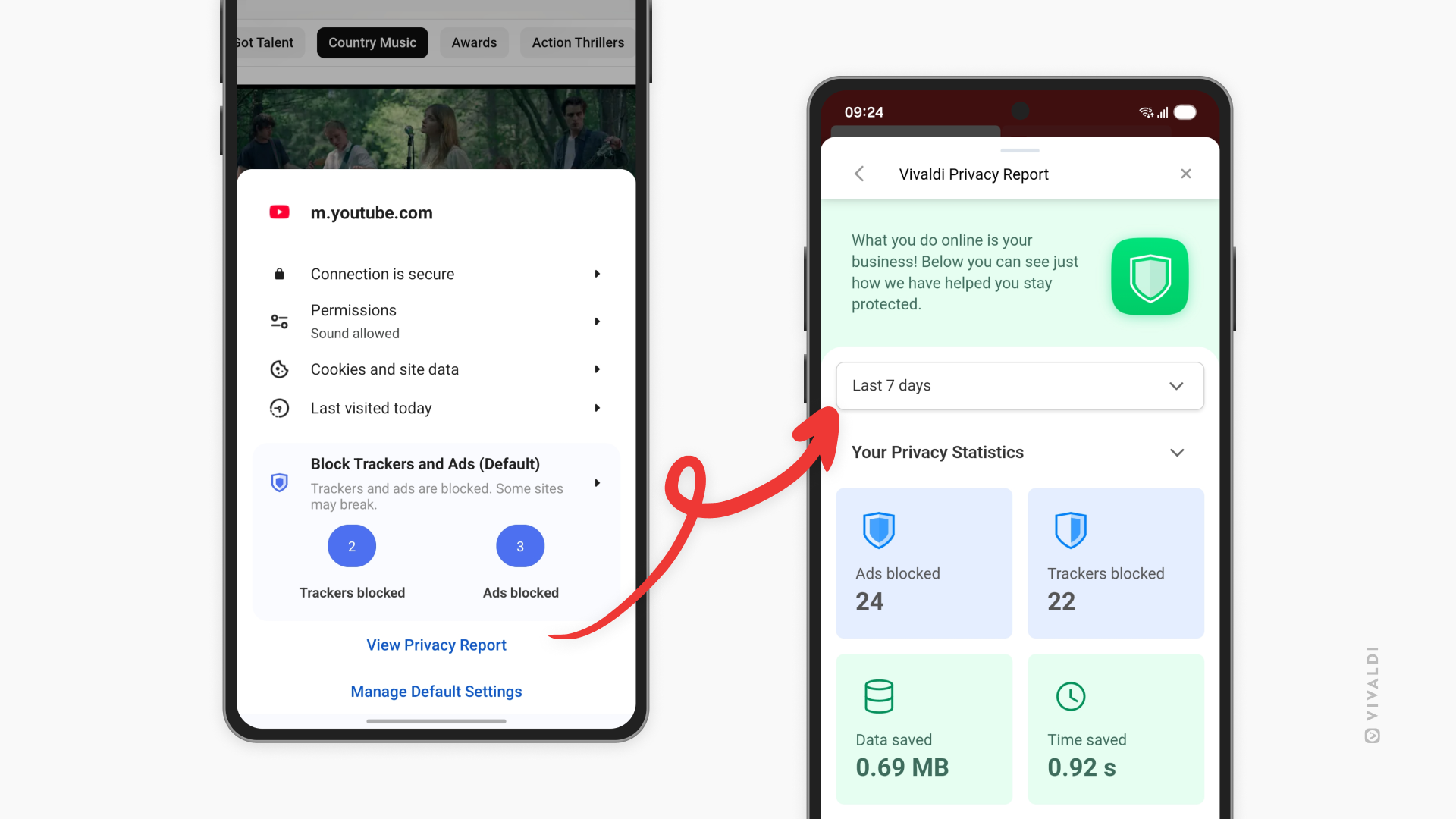
Your phone follows you everywhere. Your browser shouldn’t help companies do the same. That’s why we’ve added the Privacy Dashboard to Vivaldi for Android.
The Privacy Dashboard shows you exactly which trackers and ads Vivaldi has blocked while you browse. It’s not just a number, it’s a window into how much of the web is designed to follow you around. Every blocked tracker is one less company building a profile on your habits, your interests, your life.
Think of it as a reality check on the modern web. The numbers might surprise you. Some websites try to load dozens of trackers before you even finish reading the headline. With the Privacy Dashboard, you’ll see it all and understand exactly what Vivaldi is protecting you from. You can access the Privacy dashboard form the shield icon in the Address Bar.
Transparency matters. You deserve to know what’s happening behind the scenes while you browse. The Privacy Dashboard puts that information right at your fingertips.
Choose your password manager
Vivaldi has a solid password manager built right in. But maybe you’ve been using Bitwarden, 1Password, or another password manager for years and you trust it with your life. Why should you have to change?
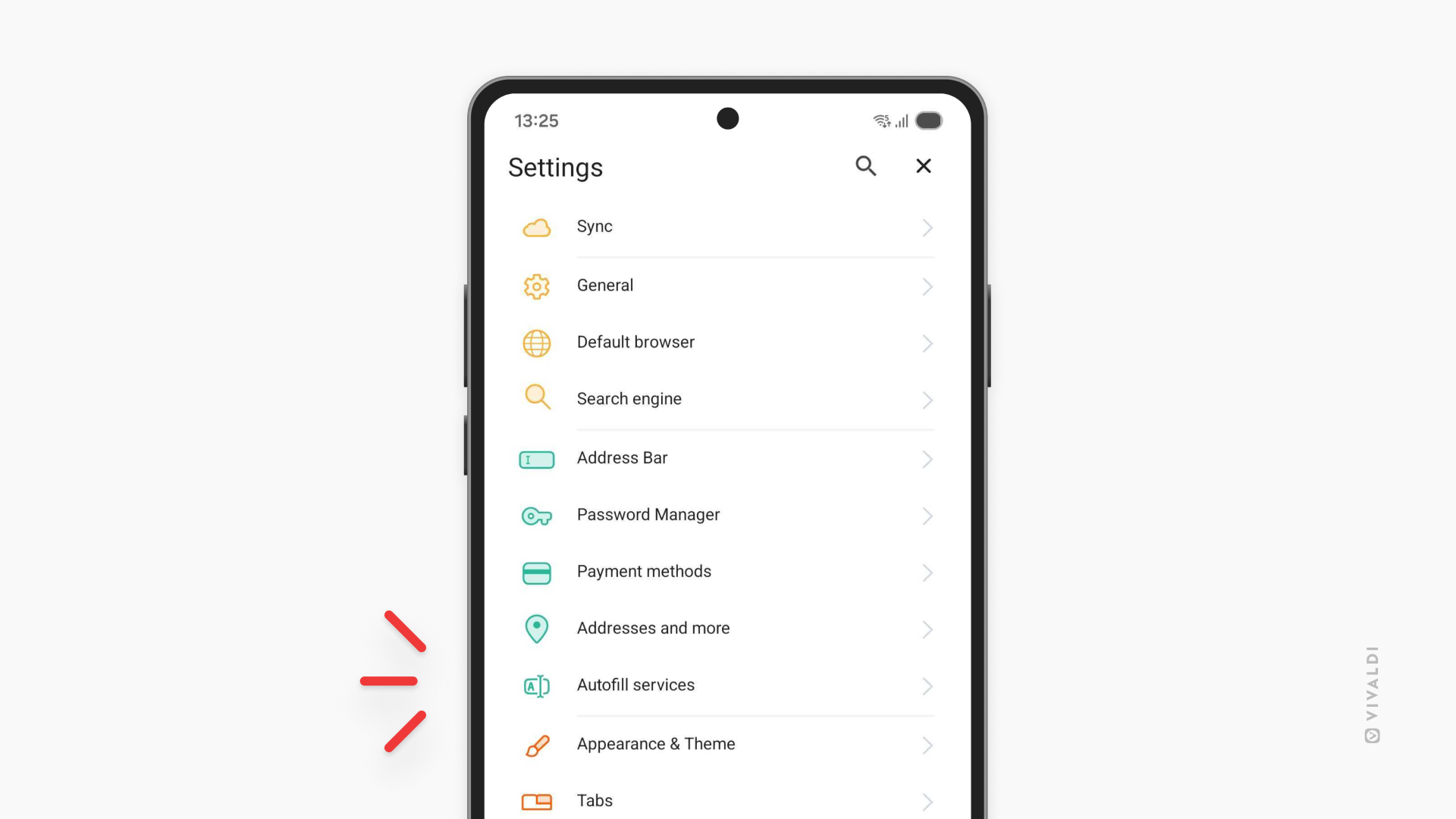
Now there’s a setting in Vivaldi for Android where you can decide: use Vivaldi’s internal password manager, or hand off login assistance to a third-party password manager you already trust. It’s your choice to make. The setting is named “Autofill services”.
This is part of Vivaldi’s philosophy: give you the tools, then let you decide how to use them. Your passwords are some of your most sensitive data. You should be in control of where they’re stored and how they’re managed.
The little things that add up
Sometimes the best features are the ones that get out of your way. This release includes two settings that do exactly that:
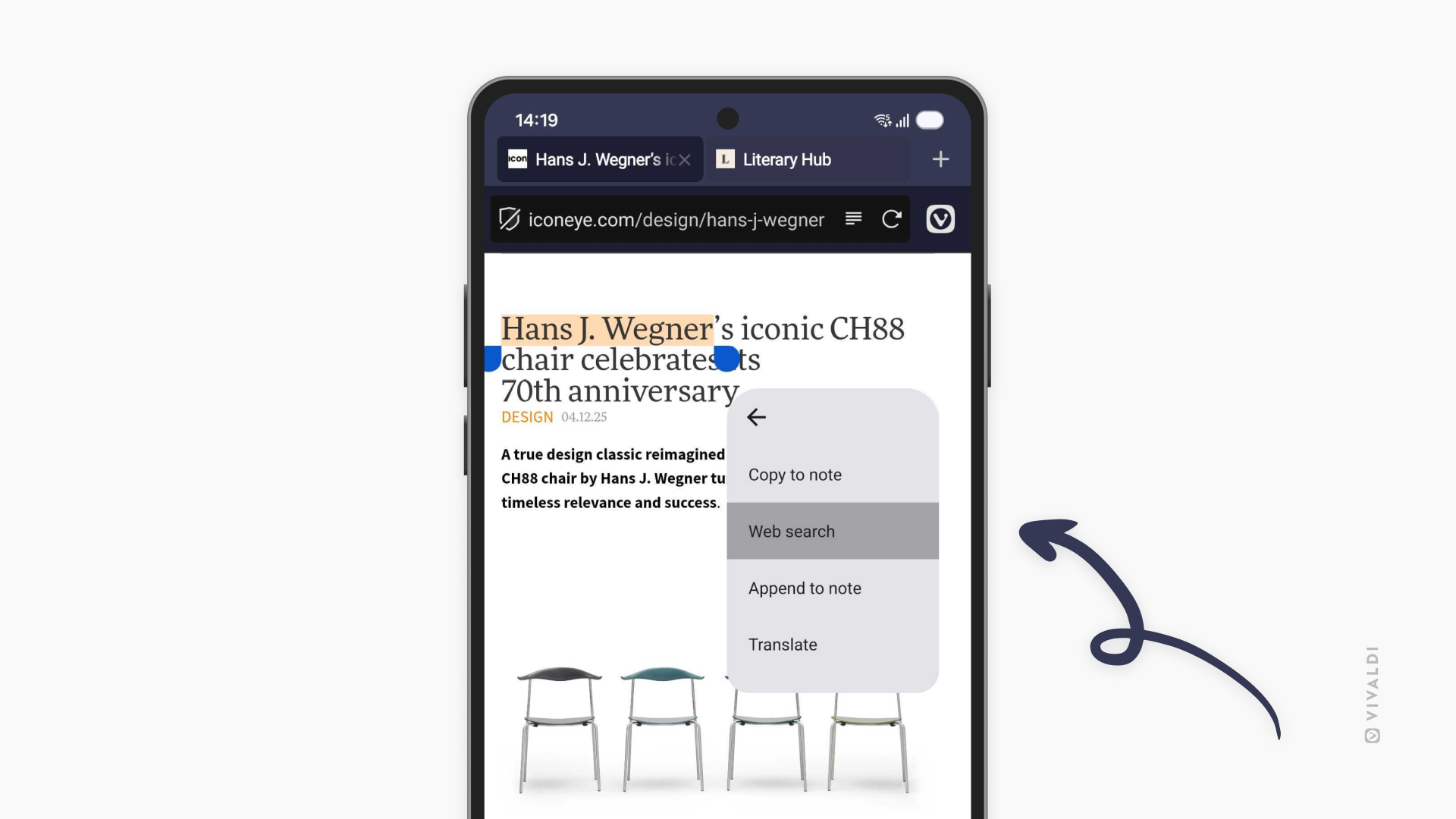
Search privately, faster. You can now search with selected text directly in private tabs. Highlight any text on a page, and you’ll see the option to search for it in a new private tab. Quick, convenient, and your search history stays private.
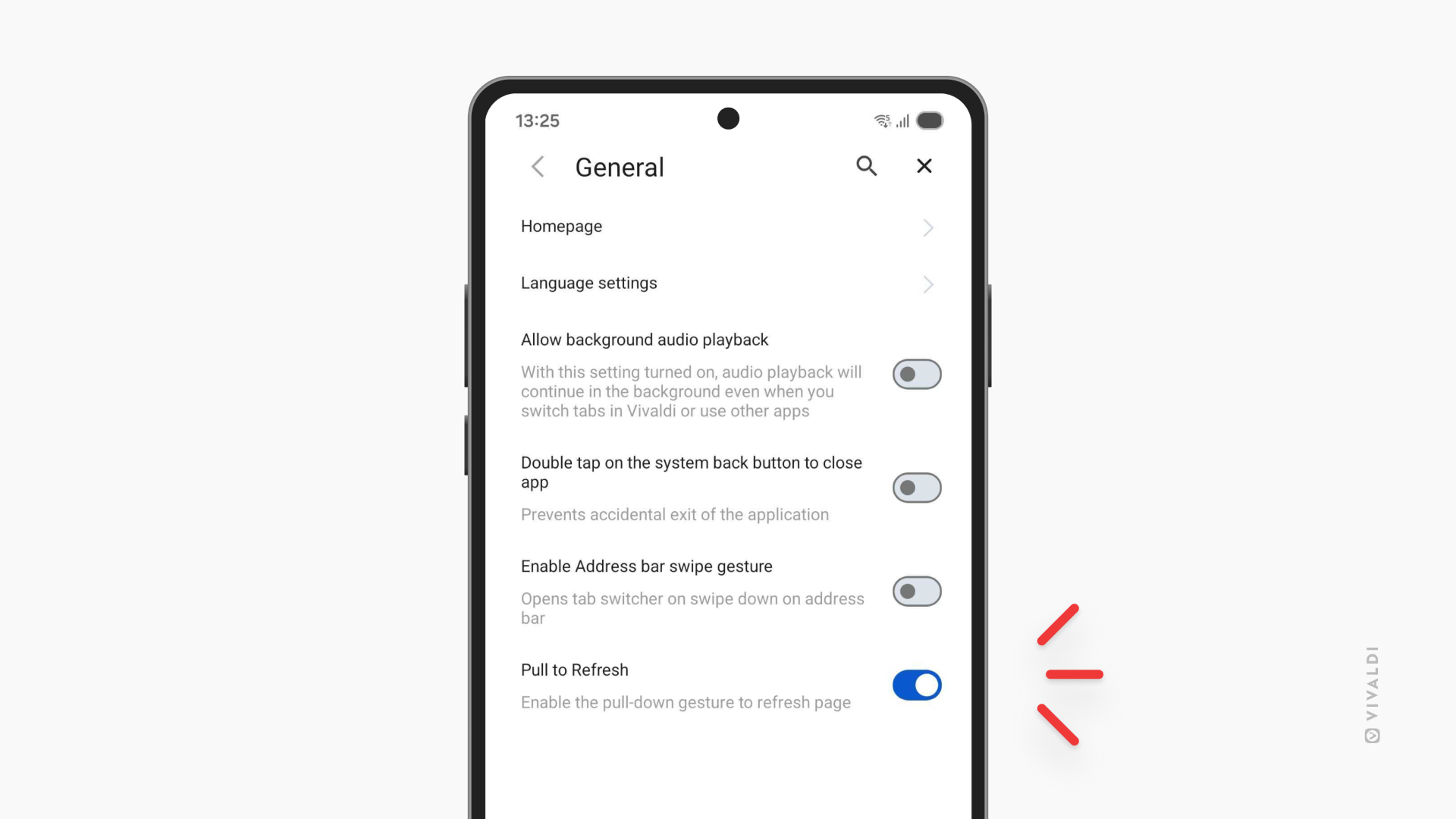
Disable pull-to-refresh. If you’ve ever accidentally triggered a page reload mid-scroll (and who hasn’t?), this one’s for you. Head to Settings and turn off pull-to-refresh. No more losing your place because you swiped a little too enthusiastically.
iOS: Faster, smoother, more personal
The iOS update is all about streamlining your workflow. Three features that remove friction and keep you moving.
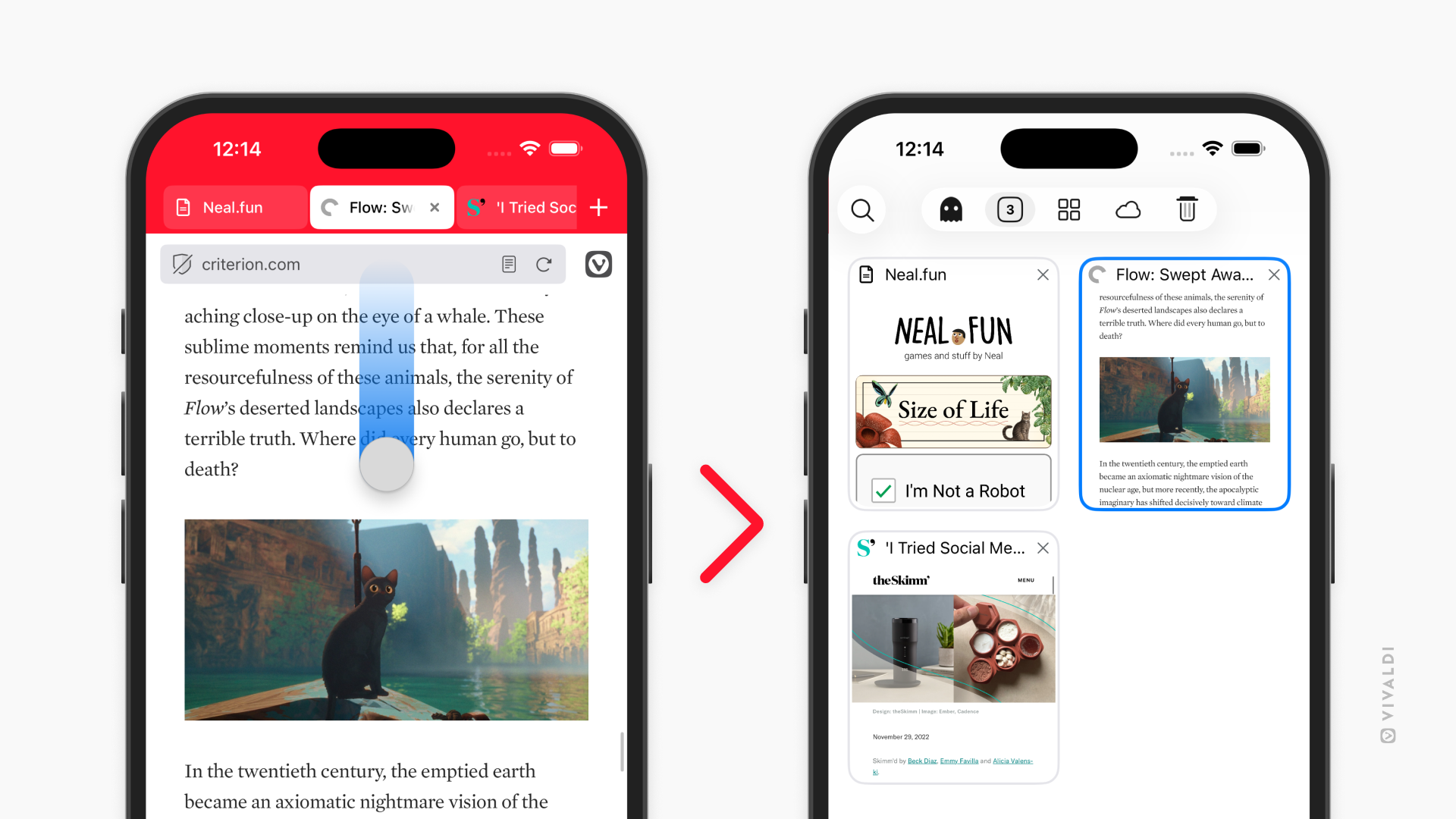
Swipe to switch tabs. Your Address Bar just became a shortcut. Swipe up or down on it to jump straight into the tab switcher. It’s one of those gestures that feels natural the moment you try it, faster than tapping, more fluid, exactly where your thumb already is. To enable it, go to Settings > Address Bar > Enable Adress Bar swipe gesture.
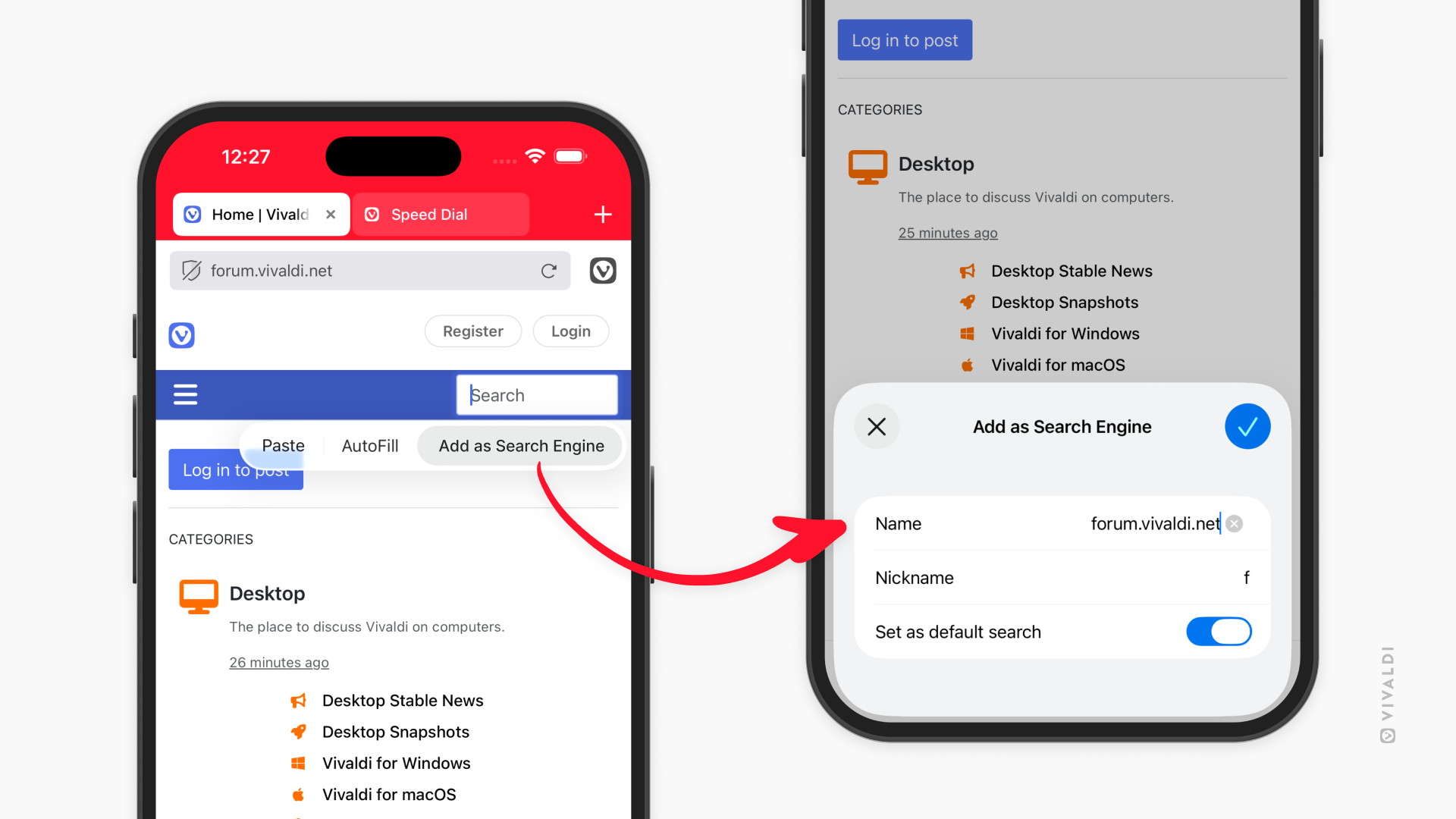
Add search engines from any website. This feature launched on Android in version 7.7, and now it’s on iOS too. Found a specialized search you want to use regularly? Long-press the search field, select “Add as Search Engine,” and it’s yours. Your university library, your company’s documentation, niche databases, now they’re all just a tap away in your search options.
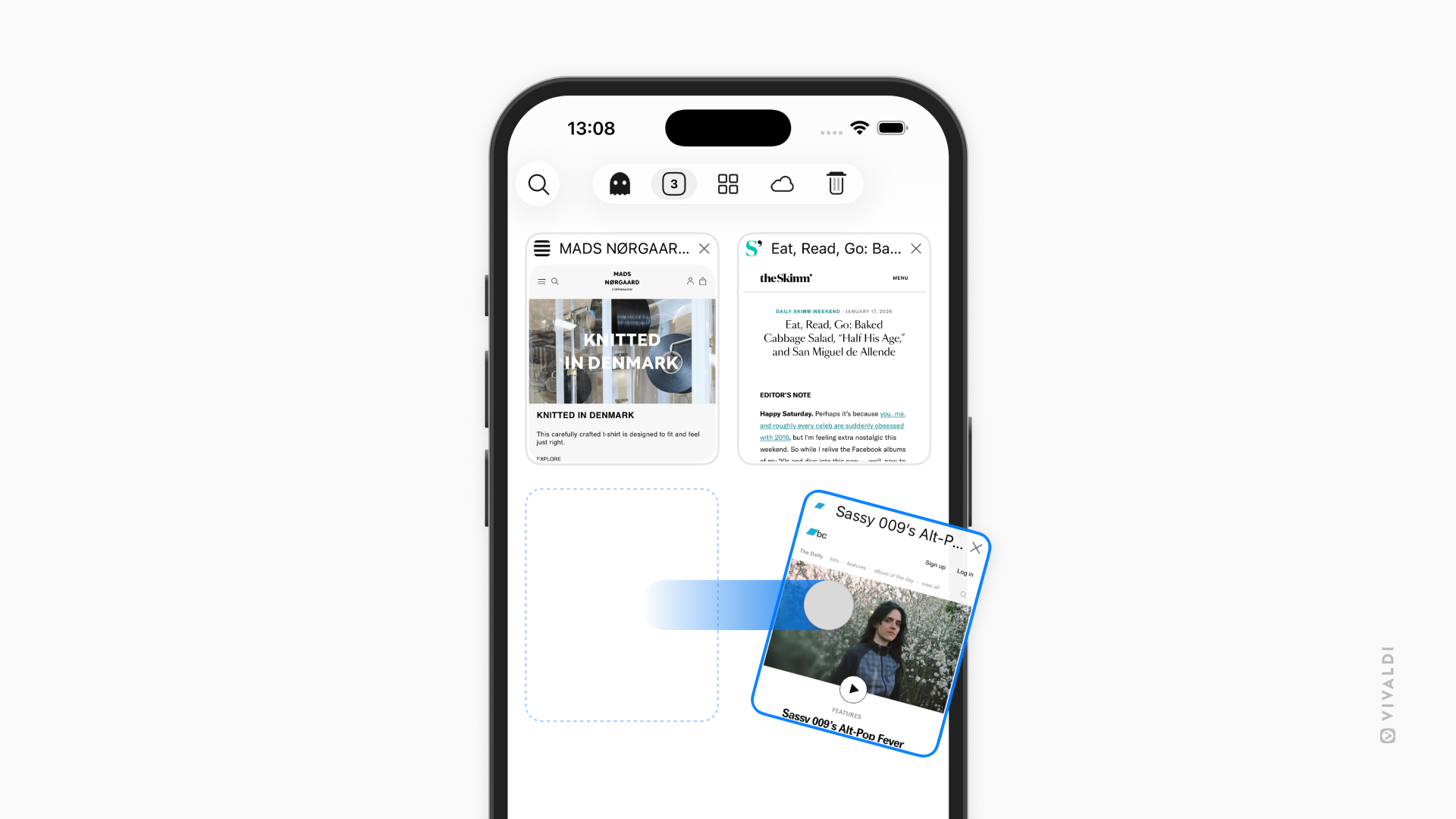
Swipe away tabs. In the Tab Switcher, you can now close tabs with a quick swipe. No more hunting for tiny X buttons. Just swipe and it’s gone. When you’re managing dozens of tabs, these small gestures add up to a much smoother experience. You can find this setting under Settings > Tabs > Tab Behaviour > Swipe to close tab.
Vivaldi 7.8 for Mobile is available now:


As always, thank you for being part of the Vivaldi community. Together, we’re fighting for a better web, one release at a time.
Changelog from Vivaldi 7.7 to 7.8 Android
[New] Pin tabs (VAB-12263)
[New] Privacy dashboard (VAB-8229)
[New][Menus] Allow searching with selected text in Private Tabs (VAB-1166)
[New][Settings] Add a setting to disable pull to refresh (VAB-11865)
[New][Settings] Support different autofill services (VAB-12098)
Address Field
[Address Field] Becomes white when moved to the bottom via context menu (VAB-12163)
[Address field] Reverse suggestions not working (VAB-12046)
[Address field] Suggestions are not at the bottom anymore, when Address Bar is at the bottom (VAB-11960)
Bookmarks
[Bookmarks] Blank screen after editing a Bookmark folder (VAB-12351)
[Bookmarks] Do not export trashed bookmarks (VAB-11849)
[Bookmarks] Import/export options are displayed in the Reading List and deleted bookmark folder (VAB-12086)
[Bookmarks] Improve saving of exported Bookmarks file (VAB-12017)
Panel
[Panel] Enable inline search in Downloads Panel (VAB-12113)
[Panel] Extra search icon shown in the Notes Panel (VAB-12148)
[Panel] Make selected History items look and behave the same as selected Bookmarks.(VAB-9737)
[Panel] Make selected Notes items look and behave the same as selected Bookmarks (VAB-12040)
[Panel] No placeholder text/image after deleting all History (VAB-12073)
[Panel] Update Downloads Panel’s search UI to same style as Bookmarks (VAB-12093)
Start Page
[Start page] Dials run off screen in landscape mode (VAB-12224)
[Start Page] Folders are not displayed when there are no Speed Dial items (VAB-12301)
[Start Page] No “Create new group” prompt on an empty start page (VAB-12352)
Tabs
[Tabs] Despite tab stacking being disabled, it is still possible to stack with various menus (VAB-12189)
[Tabs] Exiting from full screen video doesn’t center tab bar on the video tab (VAB-11615)
[Tabs] “Open in new tab stack” is not available immediately after installing (VAB-12276)
[Tabs] Prevent Tab Stacks from having only one tab (VAB-12188)
[Tabs] Reordering tabs in a stack is broken (VAB-12320)
[Tabs] Show correct tab stack title (VAB-12312)
[Tabs] Tab size adjustments (VAB-12336)
Other
[Audio] Background audio playback stopped working on YouTube (VAB-12333)
[Custom Search Engine] URLs replace ‘%s’ with ‘%7BsearchTerms%7D’ (VAB-12254)
[Custom Search Engine] Wrongfully shown error when editing a search engine (VAB-12089)
[Desktop mode] Enable default settings for Desktop mode (VAB-12049)
[Desktop mode] Should not be possible to close the last tab (VAB-12283)
[Dex] Window control buttons appear when enabling Dex and overlap UI (VAB-12090)
[Menu] Gap below the main menu varies on different devices (VAB-12287)
[Menu] Remove old tab context menu and add the items to the new context menu (VAB-12303)
[Notifications] Enable Privacy Dashboard notifications (VAB-12279)
[Reding List]Page not added to Reading List if tab/page in reading mode (VAB-11919)
[Search Engine] ‘Add as Search Engine’ not showing bottomsheet when clicked (VAB-12259)
[Search Engine] Search Engine Nicknames don’t get disabled (VAB-12083)
[Settings] Exiting Settings’ search leaves an empty Settings page (VAB-12101)
[Settings] Move ‘Enable Address Bar swipe gesture’ from General to Address Bar (VAB-12277)
[Speed dials] Folder bug (VAB-12290)
[Startup] Inactive tab sheet appears on start-up sometimes (VAB-11982)
[Sync] Add a direct link to Vivaldi account’s profile page (VAB-12006)
[Tablet][Address field] Suggestion field pops up in the middle of the screen (VAB-11904)
[Tablet][Window] New tab icon is mispositioned in a pop-up window (VAB-12115)
[UI] Reader View button in the Address Field is in the wrong color when Tab Bar is hidden (VAB-12078)
[UI] Update History search UI to same style as bookmarks (VAB-11741)
This version contains several additional enhancements and bug fixes for a better overall experience.
Updated Chromium to 144.0.7559.167
Changelog from Vivaldi 7.7 to 7.8 iOS
New
[New][Address bar] Add a setting to swipe up/down address bar to enable tab switcher (VIB-615)
[New][Search Engine] Allow adding Custom Search Engines from web pages (VIB-1441)
[New][Tab Switcher] Swipe to close tabs option (VIB-572)
Tab Switcher
[Tab Switcher] Pin inactive tabs at the top in tab switcher (VIB-1683)
[Tab Switcher] Fix tab preview corner radius for both tabs and stacks grid items.
[Tab Switcher] Tab grid background color for private tab is changed to purple from black/dark gray to unify with Android and Desktop.
[Tab Switcher] Tabs in private tabs stacks showing incorrect color for the header.
[Tab Switcher] Private tabs stack showing white background on light mode, it should show dark. (VIB-1686)
[Tab Switcher] Private Tabs view with no tabs open has elements in wrong colors (VIB-1690)
Other
[Accessibility] iOS’ transparency setting makes some Vivaldi menus and pages blank (VIB-1547)
[Custom Search Engine] Updating Google search engine name and nickname is not working (VIB-1668)
[iOS26] Password manager title is not centred (VIB-1546)
[iOS26][iPad] Main menu gets pushed to the side when resizing window (VIB-1571)
Missing iCloud Backup exceptions (VIB-895)
[Panel] Add search field for Reading List (VIB-1549)
[Panel][UI] Translation histories are cut off at the bottom (VIB-1630)
[Reader view] Functional issue after exiting reader view (VIB-1445)
[Reader View] Update grey theme for reader view (VIB-1673)
[Search Engine] Can’t delete some search engines (VIB-1548)
[Search Engine] Search Engine Nicknames aren’t disabled (VIB-1570)
[Sync] Add a direct link to Vivaldi account’s profile page (VIB-1536)
[Tabs] Toolbar gesture doesn’t switch tabs properly when tab bar enabled (VIB-1679)
[Theme] Tabs in tab switcher ignores app light theme when OS uses dark mode (VIB-1632)
This version contains several additional enhancements and bug fixes for a better overall experience.
Updated Chromium to 144.0.7559.114