
Vivaldi vs. Firefox
Both Vivaldi and Firefox have a strong anti-Big Tech stance. However, one is based in San Francisco and primarily funded by Google, and the other is an Oslo-based employee-owned company funded by Jon von Tetzchner. Whilst Vivaldi has no AI built in, Firefox includes AI tools enabled by default.
Firefox relies heavily on features only being available by users installing add-ons, Vivaldi has the biggest range of built-in features, for a seamless and secure browsing experience. Let’s take a closer look at the feature differences between these two browsers.
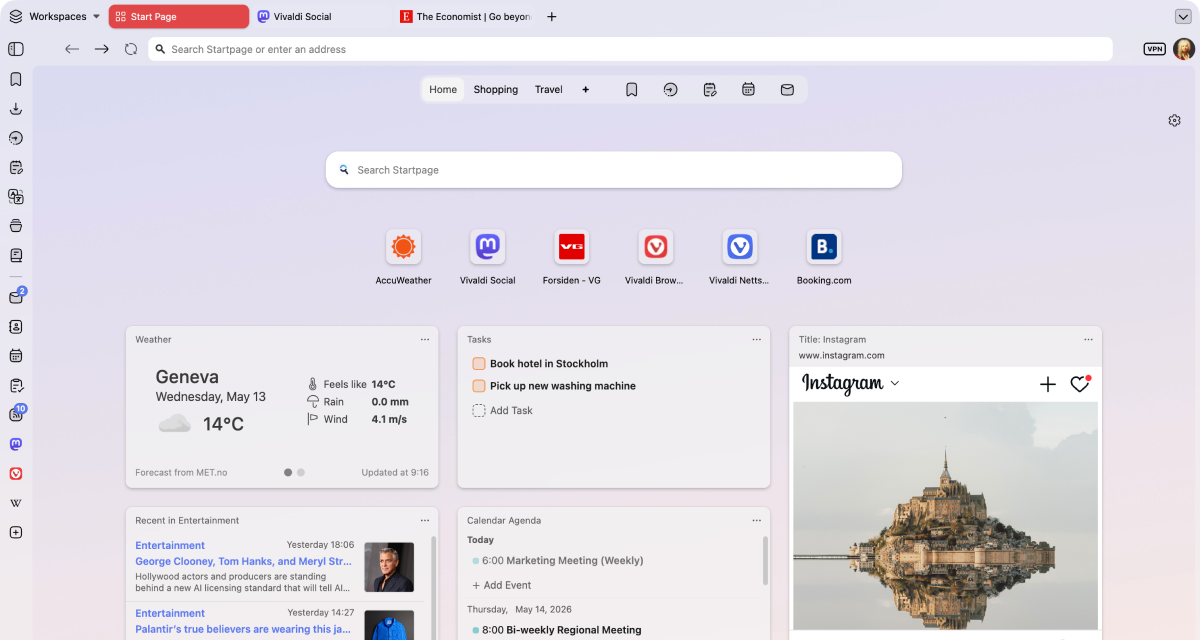
Produktivitet
Vivaldi is the most customizable browser in the world! Why is this important to your productivity? Elementary. It means you can make Vivaldi work just the way you need it to.
Everyone uses their browser to get something done: work, studies, shopping, research, or simply for entertainment. Vivaldi is packed with useful features to minimize distractions and help you get the task done, efficiently.
With unrivaled tab management features, a myriad of customizable shortcuts and powerful built-in tools, you’ll be able to get more done, and have fun while doing it.
 Fuld understøttelse
 Delvis understøttelse
 Ingen understøttelse
| Funktioner |  |  |
|---|---|---|
| Two-level tab groups |  Fuld understøttelse Fuld understøttelse |  Ingen understøttelse Ingen understøttelse |
| Fanegrupper | Fuld understøttelse | Fuld understøttelse |
| Ubegrænsede faner i delt skærm | Fuld understøttelse | Ingen understøttelse |
| Brugerdefineret placering af fanelinjen | Fuld understøttelse |  Delvis understøttelse Delvis understøttelse |
| Brugerdefineret placering af adresselinjen | Fuld understøttelse | Ingen understøttelse |
| Periodisk genindlæsning af faner | Fuld understøttelse | Ingen understøttelse |
| Installer websites som PC-apps (PWA’er) | Fuld understøttelse | Delvis understøttelse |
| Brugerdefinerede makroer | Fuld understøttelse | Ingen understøttelse |
| Brugerdefinerede musebevægelser | Fuld understøttelse | Ingen understøttelse |
| Brugerdefinerede tastaturgenveje | Fuld understøttelse | Fuld understøttelse |
| Pomodoro timer | Fuld understøttelse | Ingen understøttelse |
| To-do list | Fuld understøttelse | Delvis understøttelse |
| Brugerdefinerede apps og sider i browserens sidepanel | Fuld understøttelse | Delvis understøttelse |
| Manuel fanedvale (RAM-besparelse) | Fuld understøttelse | Fuld understøttelse |
| Pause-tilstand | Fuld understøttelse | Ingen understøttelse |
| Indbygget note-editor | Fuld understøttelse | Ingen understøttelse |
| Indbygget mail | Fuld understøttelse | Ingen understøttelse |
| Indbygget kalender | Fuld understøttelse | Ingen understøttelse |
| Arbejdsområder | Fuld understøttelse | Ingen understøttelse |
Vivaldi leads on tab management and productivity — with unique built-in features that make it stand out from the crowd.
Privatliv
Most browsers claim to protect your privacy, but their business models often depend on some level of profiling or surveillance.
At Vivaldi, we reject these practices and believe what you do on your browser is your business and nobody else’s. We give you the tools you need to protect yourself from Big Tech’s prying eyes, like a built-in ad and tracker blocker with custom lists, Proton VPN and end-to-end encrypted data sync. With Vivaldi, you’re in control!
Fuld understøttelse
Delvis understøttelse
Ingen understøttelse
| Funktioner | | |
|---|---|---|
| Indbygget annonceblokering | Fuld understøttelse | Ingen understøttelse |
| Beskyttelse mod trackere | Fuld understøttelse | Fuld understøttelse |
| Brugerdefinerede blokeringslister | Fuld understøttelse | Delvis understøttelse |
| Sikker synkronisering med krypteringsnøgle | Fuld understøttelse | Fuld understøttelse |
| Ingen sporing og profilering af brugeradfærd | Fuld understøttelse | Ingen understøttelse |
| Free unlimited VPN | Fuld understøttelse | Delvis understøttelse |
| European | Fuld understøttelse | Ingen understøttelse |
| Data stored in Europe | Fuld understøttelse | Ingen understøttelse |
Private by default: no profiling, no data selling, with built-in tracker & ad blocker and a free VPN provided by Proton.
Indbyggede funktioner
At Vivaldi, our goal is to provide you with a browser that has all the built-in functionality you need. Our mantra is “a browser that adapts to you, not the other way around”, and because we all have different needs and likes, that means a browser packed with powerful built-in features.
If what you need somehow isn’t already built into Vivaldi, you can install extensions from the Chrome Web Store (they work great in Vivaldi too!), or come to our Forum and make a feature request. We thrive on user feedback: that’s how we develop and grow, as we have no shareholders or investors pulling our strings.
Vivaldi has features you want, and the features you didn’t know you needed that you won’t be able to live without.
Fuld understøttelse
Delvis understøttelse
Ingen understøttelse
| Funktioner | | |
|---|---|---|
| Skærmbilledværktøj i browseren | Fuld understøttelse | Fuld understøttelse |
| Privat oversættelsesværktøj til hele sider | Fuld understøttelse | Fuld understøttelse |
| Pop-op videoer på ethvert website | Fuld understøttelse | Fuld understøttelse |
| Brugerdefinerede delbare temaer | Fuld understøttelse | Delvis understøttelse |
| Redigerbare værktøjslinjer | Fuld understøttelse | Fuld understøttelse |
| Full Chromium extensions compatibility | Fuld understøttelse | Ingen understøttelse |
| Brugerdefinerede søgemaskiner | Fuld understøttelse | Fuld understøttelse |
| Page Actions to modify the look of pages | Fuld understøttelse | Ingen understøttelse |
| Reader mode | Fuld understøttelse | Fuld understøttelse |
| Indbygget mail | Fuld understøttelse | Ingen understøttelse |
| Indbygget kalender | Fuld understøttelse | Ingen understøttelse |
| Indbygget feed-læser | Fuld understøttelse | Ingen understøttelse |
| Visuel historik med statistikker | Fuld understøttelse | Ingen understøttelse |
| Inspektør for billeddetaljer | Fuld understøttelse | Delvis understøttelse |
| Billedanimationer til/fra | Fuld understøttelse | Delvis understøttelse |
| Billedindlæsning til/fra | Fuld understøttelse | Ingen understøttelse |
| Free from AI | Fuld understøttelse | Ingen understøttelse |
| Auto-skjul UI | Fuld understøttelse | Ingen understøttelse |
| Desktop mode on Android | Fuld understøttelse | Fuld understøttelse |
Mail, Calendar, Feed Reader, Notes and Translate — all built-in, no extensions required.

No AI
Unlike most of our competitors, Vivaldi is free from generative AI features. No summarizing tools, no chatbots, you remain in control. We have taken a stand and have chosen humans over hype.
We will not turn the joy of exploring into inactive spectatorship. Without exploration, the web becomes far less interesting. Our curiosity loses oxygen and the diversity of the web dies.
Jón von Tetzchner - CEO, Vivaldi Technologies
Vivaldi is the haven for people who still want to explore. We will continue building a browser for curious minds, power users, researchers, and anyone who values autonomy.
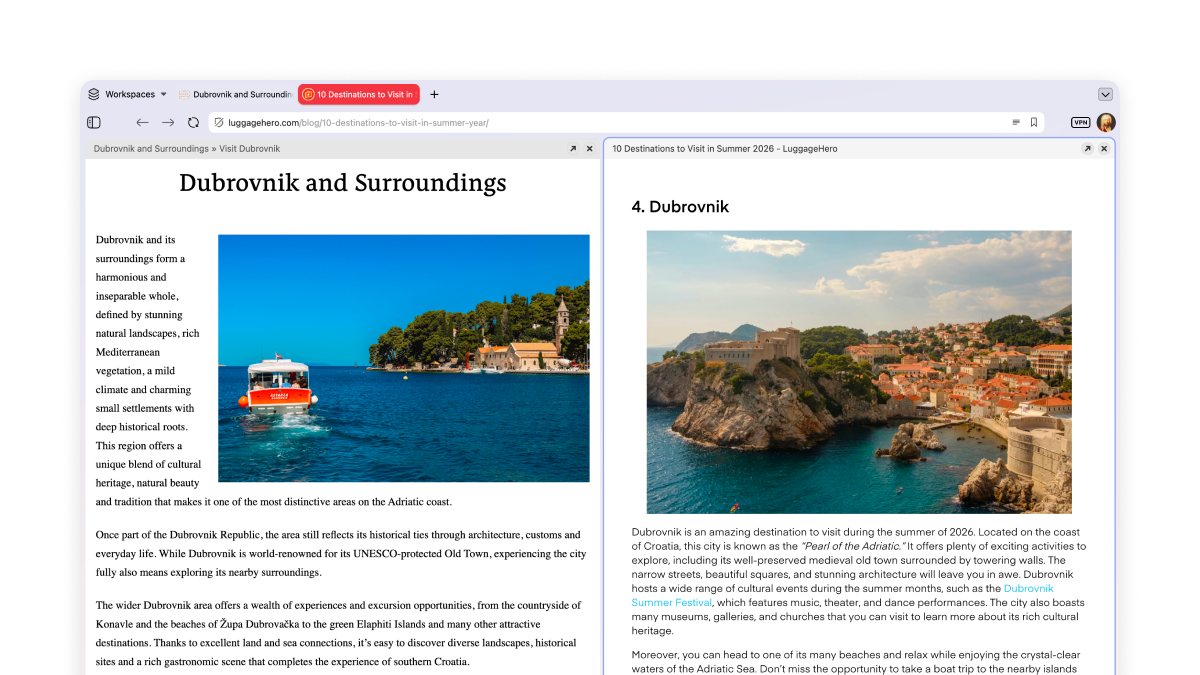
Ubegrænsede faner i delt skærm
Rudedéling af faner lader dig se flere sider på én gang, side om side eller i et gitter. Til arbejde og fritid – perfekt til at sammenligne tilbud eller følge med i flere Twitch-streams!
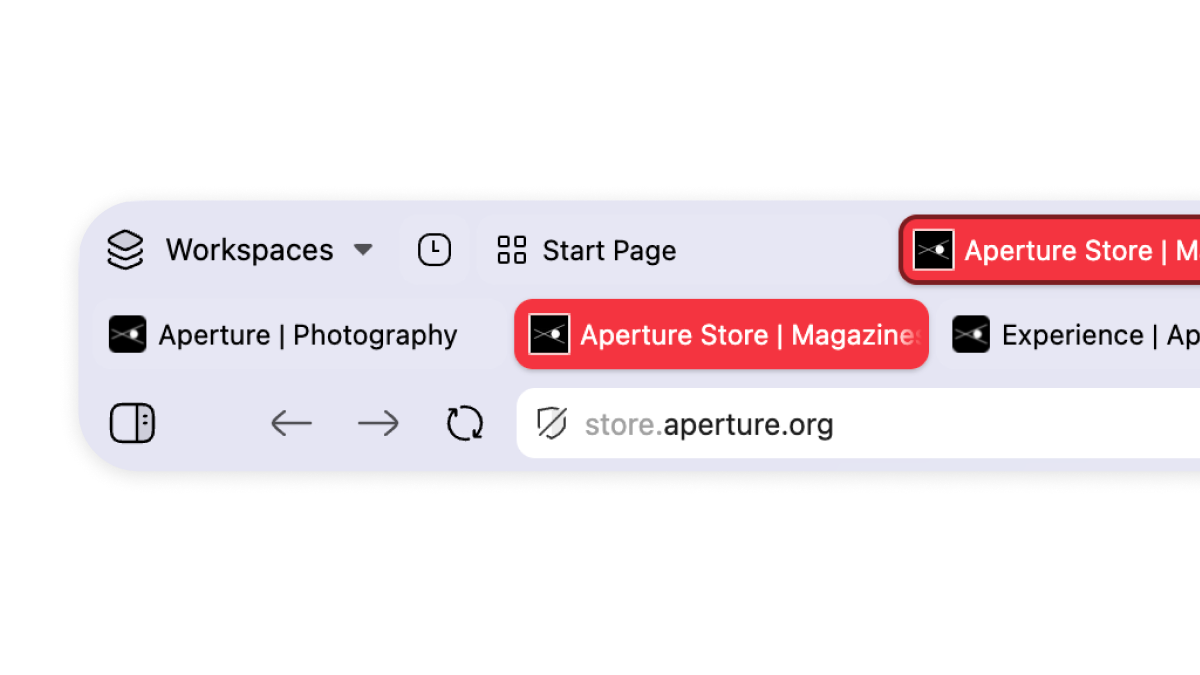
Multi-level tab groups
A key example of our unparalleled tab management. Just drag and drop your tabs to organize them in tab groups, which we call stacks. These can be renamed and colour-coded. Your stacks will remain in the main tab bar, and a second level will appear once you click on them, showing you the tabs within that group.
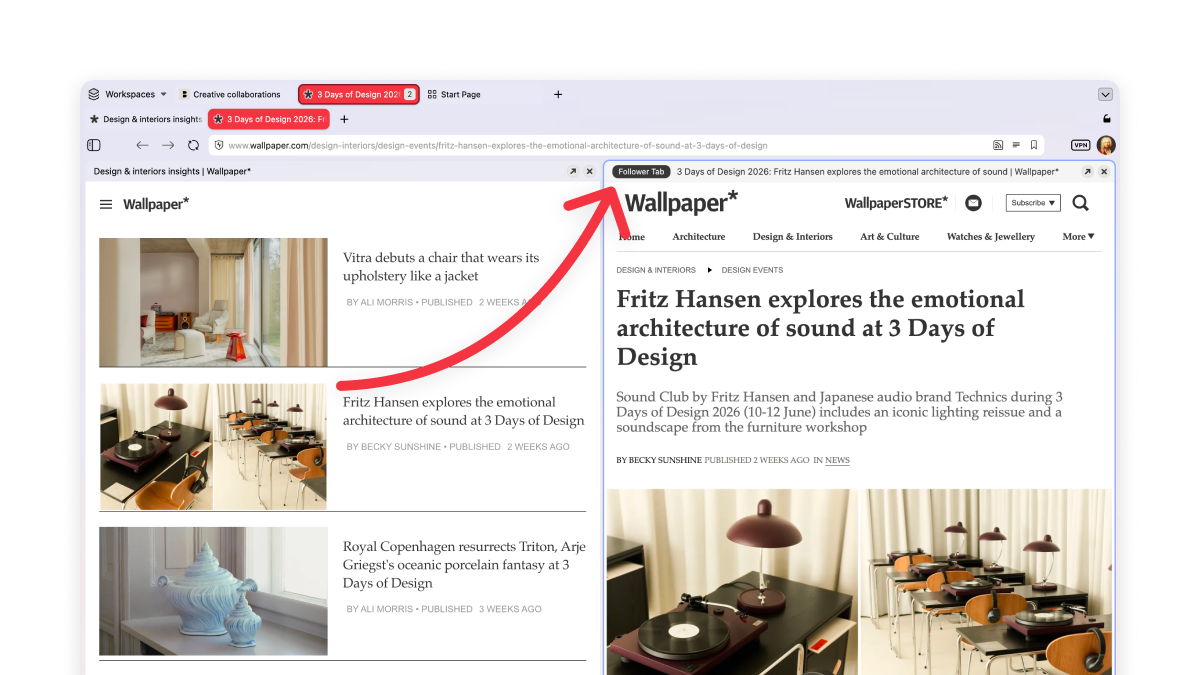
Make your tabs work for you
You know the feeling when you’re reading something good, there’s an interesting link, you click it, and twenty minutes later you’ve lost the original thread entirely and have eleven tabs open?
Not in Vivaldi. Our Follower Tab lets you open links in split-screen view, keeping the original page to your left.
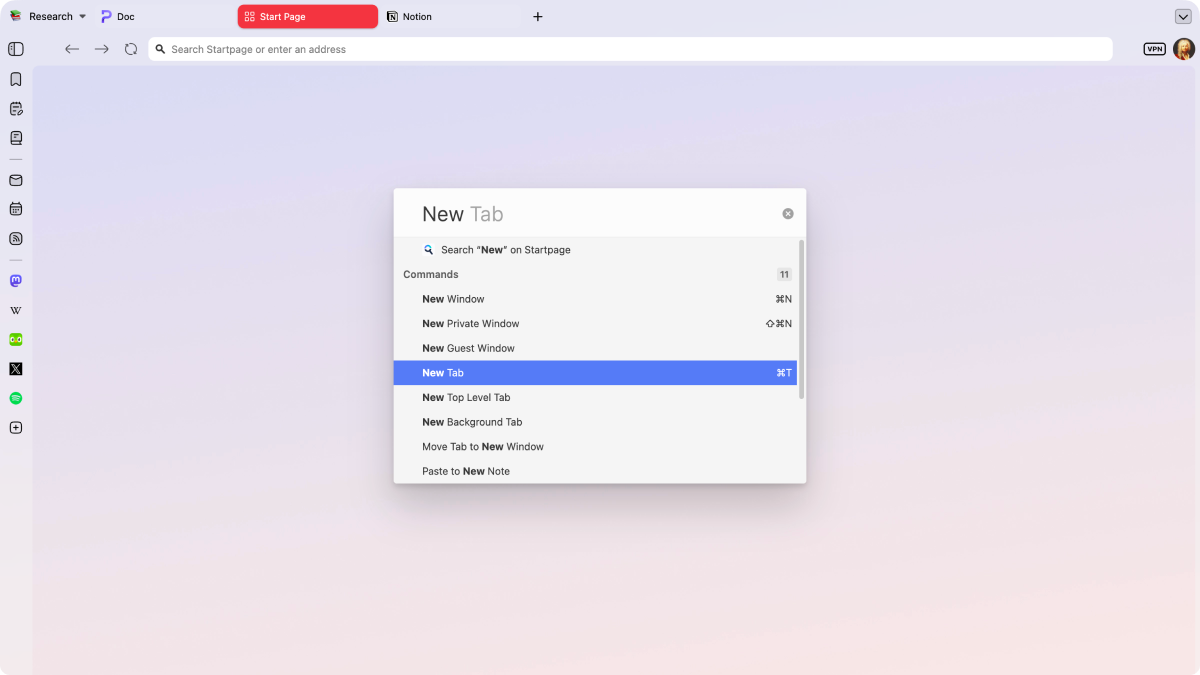
Styr alt med Hurtigkommandoer
Hurtigkommandoer er Vivaldi’s universelle søge- og kontrolcenter. Søg øjeblikkeligt i faner, bogmærker, historik eller på nettet, og udfør browserkommandoer – alt på ét sted.
Ofte stillede spørgsmål
-
Er Vivaldi baseret på Firefox?
No. Vivaldi runs on the Chromium engine, the open-source project behind Chrome and most other major browsers. Firefox runs on Mozilla’s own Gecko engine. Both browsers are often recommended as independent and customizable alternatives to Big Tech defaults.
-
Hvilken er bedst til privatliv, Firefox eller Vivaldi?
Both browsers have tracker blocker protection, but while Vivaldi’s ad blocker is built in, Firefox users need a third-party extension. Vivaldi is also built and headquartered in Norway and hosts encrypted user data in Iceland, being therefore bound by European GDPR laws.
-
Once I first install Vivaldi, will my Firefox and Vivaldi bookmarks stay in sync, or is the import a one-time transfer?
Import is one-time, not continuous. Vivaldi’s setup wizard pulls in your existing Firefox bookmarks, passwords, and history when you switch, but the two browsers won’t stay mirrored, because Firefox Sync and Vivaldi Sync are separate systems. If you keep using both, you'll manage bookmark syncing yourself from then on.
-
Will my Firefox extensions and add-ons work in Vivaldi?
Vivaldi is compatible with Chromium extensions, not Firefox’s add-ons, so anything installed from addons.mozilla.org won’t be carried over. Many extensions Firefox users install aren’t needed in Vivaldi due to our built-in functionality. Others can be found in the Chrome Web Store.
-
Does Vivaldi have an ad blocker?
Vivaldi has its own built-in ad and tracker blocker rather than rely on third-party extensions. Some websites will continuously test different ways of fighting ad blockers, so we are constantly working on updates and improvements.
Sammenlign Vivaldi med andre browsere
Last updated: October 2026