
Vivaldi vs Safari
As duas empresas por trás desses navegadores são muito diferentes em ética e valores. O Vivaldi luta com unhas e dentes por uma web melhor; a Apple encontra sistematicamente novas formas de usar a sua posição de vantagem para aumentar o seu poder e limitar a web livre.
O Vivaldi pertence aos funcionários, não tem investidores externos e tem sede na Europa. A Apple é uma das principais corporações das grandes tecnológicas americanas e recebe da Google US$ 20 mil milhões por ano para incluir a pesquisa Google como motor de busca predefinido no Safari.
O Safari é amplamente considerado pelos programadores web como "o novo Internet Explorer 6", por causa dos erros e da lentidão na adoção de standards da web. Se isso não for motivo suficiente para trocar, vamos olhar mais de perto as diferenças de funcionalidade entre estes dois navegadores.
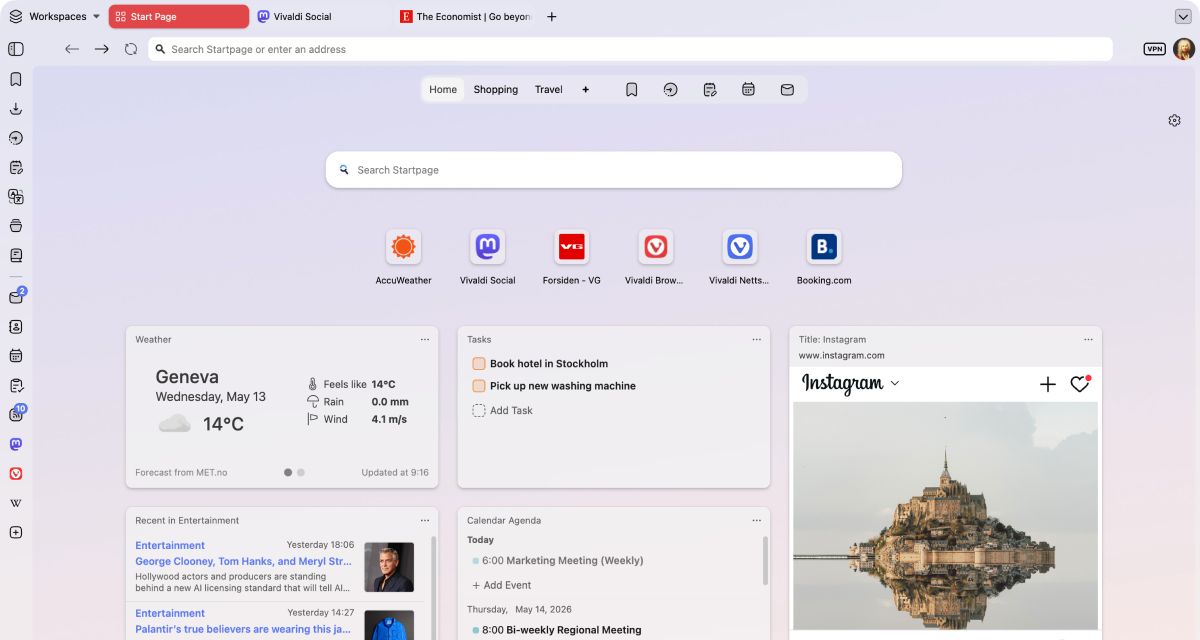
Produtividade
Vivaldi is the most customizable browser in the world! Why is this important to your productivity? Elementary. It means you can make Vivaldi work just the way you need it to.
Everyone uses their browser to get something done: work, studies, shopping, research, or simply for entertainment. Vivaldi is packed with useful features to minimize distractions and help you get the task done, efficiently.
With unrivaled tab management features, a myriad of customizable shortcuts and powerful built-in tools, you’ll be able to get more done, and have fun while doing it.
 Totalmente suportado
 Suporte parcial
 Não suportado
| Funcionalidades |  |  |
|---|---|---|
| Two-level tab groups |  Totalmente suportado |  Não suportado |
| Grupos de separadores | Totalmente suportado | Totalmente suportado |
| Separadores ilimitados a dividir o ecrã | Totalmente suportado | Não suportado |
| Localização personalizada da barra de separadores | Totalmente suportado | Totalmente suportado |
| Localização personalizada da barra de endereços | Totalmente suportado | Não suportado |
| Refrescamento periódico de separadores | Totalmente suportado | Não suportado |
| Instale websites como aplicações de computador (PWAs) | Totalmente suportado | Totalmente suportado |
| Macros personalizadas | Totalmente suportado | Não suportado |
| Gestos do rato personalizados | Totalmente suportado | Não suportado |
| Teclas de atalho personalizadas | Totalmente suportado | Não suportado |
| Pomodoro timer | Totalmente suportado | Não suportado |
| To-do list | Totalmente suportado | Não suportado |
| Aplicações e websites personalizados na barra lateral | Totalmente suportado |  Suporte parcial |
| Hibernação manual de separadores (poupa RAM) | Totalmente suportado | Não suportado |
| Modo de pausa | Totalmente suportado | Não suportado |
| Editor de notas integrado | Totalmente suportado | Não suportado |
| Correio integrado | Totalmente suportado | Não suportado |
| Calendário integrado | Totalmente suportado | Não suportado |
| Áreas de trabalho | Totalmente suportado | Não suportado |
O Vivaldi lidera na gestão de separadores e produtividade - com funcionalidades únicas integradas que o distinguem da concorrência.
Privacidade
Most browsers claim to protect your privacy, but their business models often depend on some level of profiling or surveillance.
At Vivaldi, we reject these practices and believe what you do on your browser is your business and nobody else’s. We give you the tools you need to protect yourself from Big Tech’s prying eyes, like a built-in ad and tracker blocker with custom lists, Proton VPN and end-to-end encrypted data sync. With Vivaldi, you’re in control!
Totalmente suportado
Suporte parcial
Não suportado
| Funcionalidades | | |
|---|---|---|
| Bloqueador de anúncios integrado | Totalmente suportado | Não suportado |
| Proteção contra rastreadores | Totalmente suportado | Totalmente suportado |
| Listas de bloqueio personalizadas | Totalmente suportado | Não suportado |
| Sincronização segura com chave de encriptação | Totalmente suportado | Suporte parcial |
| Sem rastreios nem monitorização de comportamento do utilizador | Totalmente suportado | Não suportado |
| Free unlimited VPN | Totalmente suportado | Não suportado |
| European | Totalmente suportado | Não suportado |
| Data stored in Europe | Totalmente suportado | Não suportado |
Privacidade por predefinição: sem perfis, nem venda de dados, com bloqueadores integrados de anúncios e de rastreios, e uma VPN gratuita fornecida pela Proton.
Funcionalidades integradas
At Vivaldi, our goal is to provide you with a browser that has all the built-in functionality you need. Our mantra is “a browser that adapts to you, not the other way around”, and because we all have different needs and likes, that means a browser packed with powerful built-in features.
If what you need somehow isn’t already built into Vivaldi, you can install extensions from the Chrome Web Store (they work great in Vivaldi too!), or come to our Forum and make a feature request. We thrive on user feedback: that’s how we develop and grow, as we have no shareholders or investors pulling our strings.
Vivaldi has features you want, and the features you didn’t know you needed that you won’t be able to live without.
Totalmente suportado
Suporte parcial
Não suportado
| Funcionalidades | | |
|---|---|---|
| Ferramenta integrada de captura de ecrã | Totalmente suportado | Não suportado |
| Ferramenta de tradução privada de páginas | Totalmente suportado | Suporte parcial |
| Vídeo flutuante em qualquer website | Totalmente suportado | Totalmente suportado |
| Temas personalizados para partilhar | Totalmente suportado | Não suportado |
| Barras de ferramentas editáveis | Totalmente suportado | Totalmente suportado |
| Full Chromium extensions compatibility | Totalmente suportado | Não suportado |
| Motores de busca personalizados | Totalmente suportado | Não suportado |
| Page Actions to modify the look of pages | Totalmente suportado | Não suportado |
| Reader mode | Totalmente suportado | Totalmente suportado |
| Correio integrado | Totalmente suportado | Não suportado |
| Calendário integrado | Totalmente suportado | Não suportado |
| Leitor de feeds integrado | Totalmente suportado | Não suportado |
| Histórico visual com estatísticas | Totalmente suportado | Não suportado |
| Inspetor de detalhes de imagem | Totalmente suportado | Não suportado |
| Ligar/desligar animação de imagens | Totalmente suportado | Não suportado |
| Ligar/desligar carregamento de imagens | Totalmente suportado | Não suportado |
| Free from AI | Totalmente suportado | Não suportado |
| Ocultar automaticamente a interface do utilizador | Totalmente suportado | Não suportado |
| Desktop mode on Android | Totalmente suportado | Não suportado |
Correio, calendário, leitor de feeds, notas e tradutor - tudo integrado, sem precisar de extensões.

No AI
Unlike most of our competitors, Vivaldi is free from generative AI features. No summarizing tools, no chatbots, you remain in control. We have taken a stand and have chosen humans over hype.
We will not turn the joy of exploring into inactive spectatorship. Without exploration, the web becomes far less interesting. Our curiosity loses oxygen and the diversity of the web dies.
Jón von Tetzchner - Diretor executivo, Vivaldi Technologies
Vivaldi is the haven for people who still want to explore. We will continue building a browser for curious minds, power users, researchers, and anyone who values autonomy.
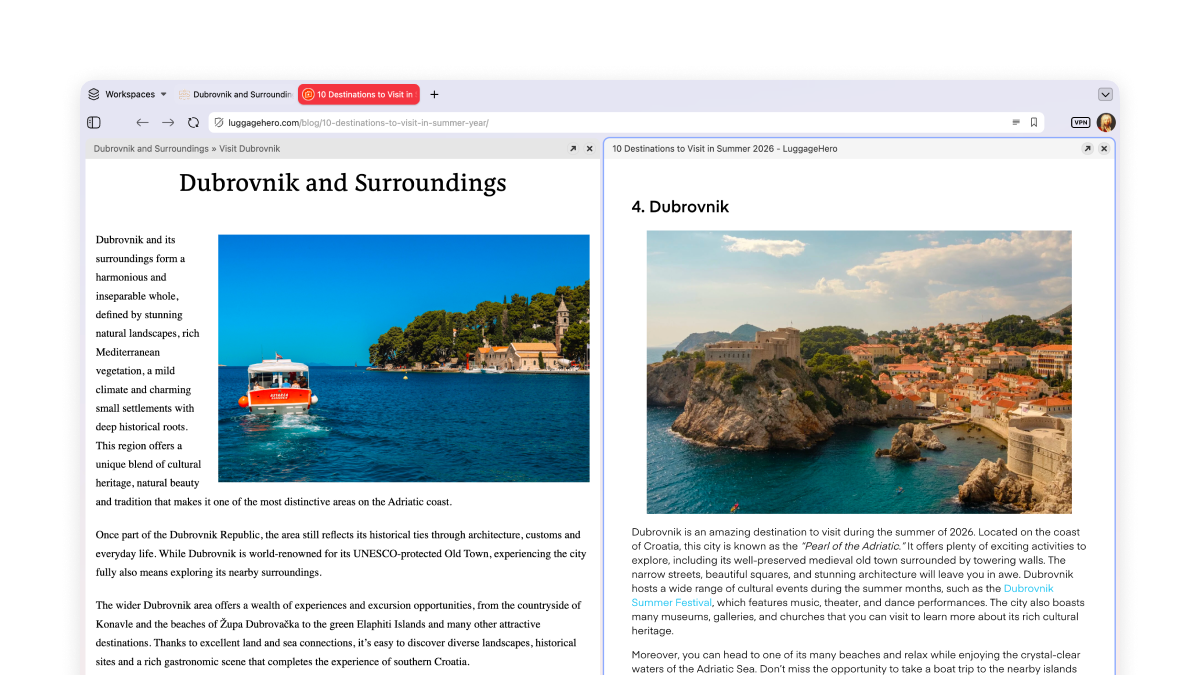
Separadores ilimitados a dividir o ecrã
O mosaico de separadores permite-lhe ver mais de uma página ao mesmo tempo, lado a lado ou em grelha. Para trabalho ou diversão - ótimo para comparar promoções ou para monitorizar várias streams Twitch!
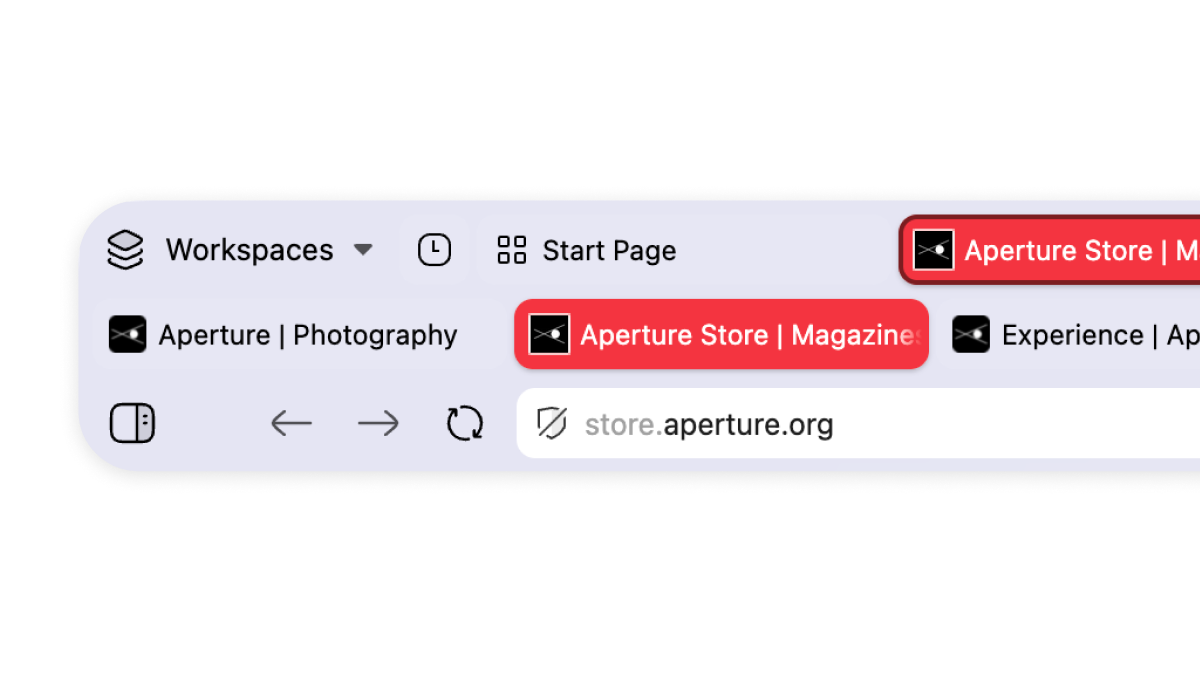
Multi-level tab groups
A key example of our unparalleled tab management. Just drag and drop your tabs to organize them in tab groups, which we call stacks. These can be renamed and colour-coded. Your stacks will remain in the main tab bar, and a second level will appear once you click on them, showing you the tabs within that group.
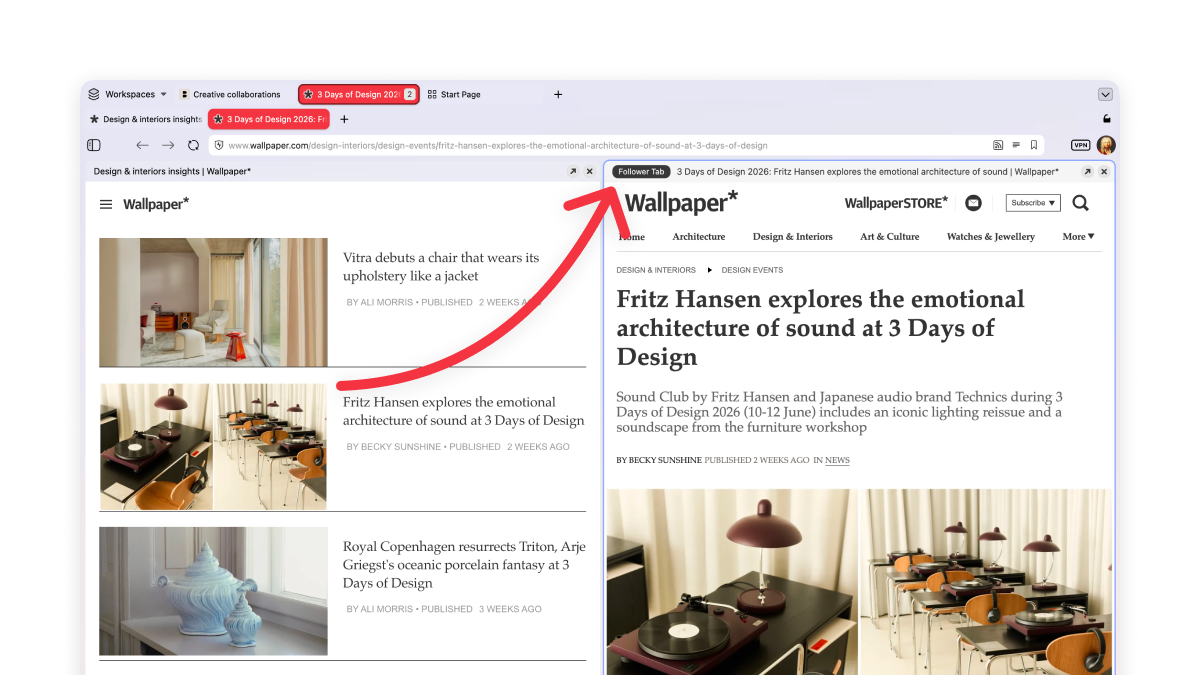
Make your tabs work for you
You know the feeling when you’re reading something good, there’s an interesting link, you click it, and twenty minutes later you’ve lost the original thread entirely and have eleven tabs open?
Not in Vivaldi. Our Follower Tab lets you open links in split-screen view, keeping the original page to your left.
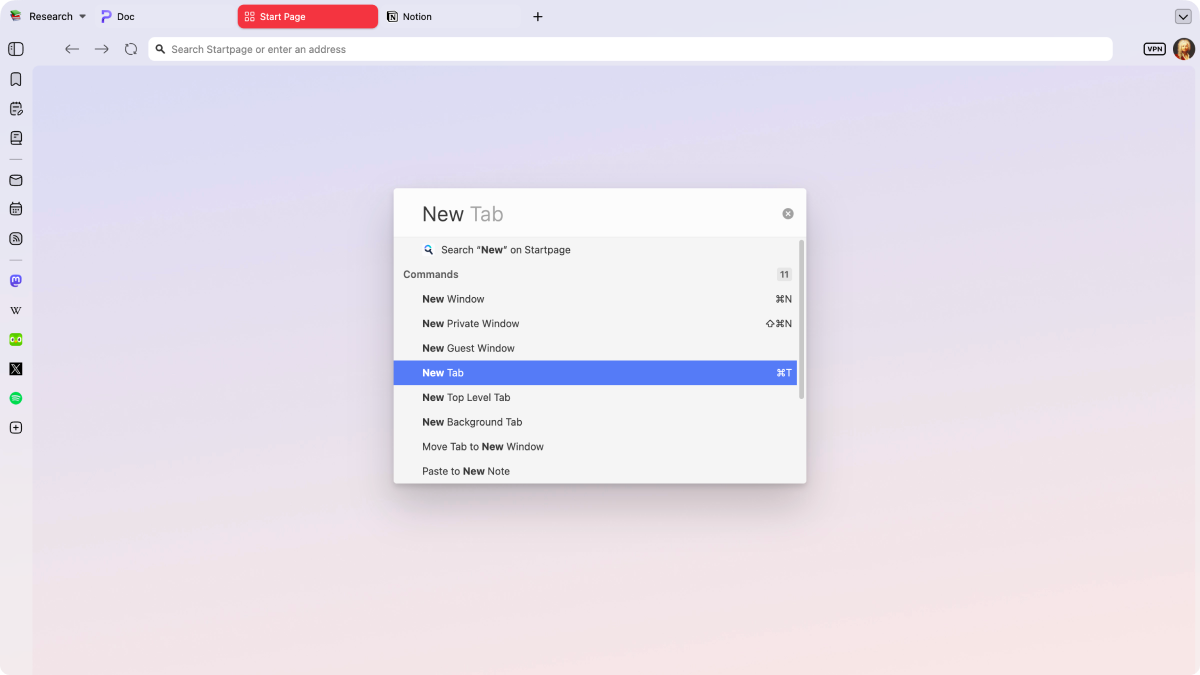
Controle tudo com comandos rápidos
Os comandos rápidos são a pesquisa universal do Vivaldi e centro de controlo. Pesquise instantaneamente separadores, favoritos, histórico ou na web e execute rapidamente comandos no navegador, tudo no mesmo local.
Perguntas frequentes
-
O Vivaldi suporta extensões?
Yes. We have a lot of built-in functionality, so you might not need some of the extensions you were used to, but if you do, you can install them from the Chrome Web Store. While Vivaldi and Safari use different extension stores, you’ll find equivalents for the most popular Apple extensions (and many more).
-
Can I import my Safari passwords into Vivaldi?
Yes, you can import your Safari passwords to Vivaldi. Vivaldi can’t read the Keychain directly, so you have to export it manually. You have to export them from Safari’s password settings as a CSV file first, then you can import the CSV into Vivaldi’s password manager.
-
How do passwords work on Vivaldi compared to Safari?
Vivaldi keeps its own separate, encrypted password manager rather than tapping into Apple’s Keychain or Contacts app. This makes Vivaldi’s passwords portable between the different operative systems via Sync.
-
Why won’t Safari let me download the Vivaldi browser?
That’s probably a macOS security prompt. Safari and macOS warn before you open an app downloaded from outside the App Store. Vivaldi is a signed, notarized Mac app, so you can allow the download through Safari (or via System Settings > Privacy & Security) and install it as normal.
Compare Vivaldi with other browsers
Last updated: October 2026