
Vivaldi 대 Safari
The two companies behind these browsers are vastly different when it comes to ethics and values. Vivaldi fights tooth and nail for a better web, Apple constantly finds new ways to utilize their gatekeeper position to increase their power and limit the free web.
Vivaldi is employee-owned, has no external investors, and is based in Europe. Apple is one of the main US Big Tech corporations, and it makes $20 billion a year from Google by bundling Google Search as the default search engine in Safari.
Safari is widely regarded by web developers as “the new Internet Explorer 6” because of browser bugs and slow adoption of web standards. If that's not reason enough for you to make the switch, let’s take a closer look at the feature differences between these two browsers.
생산성
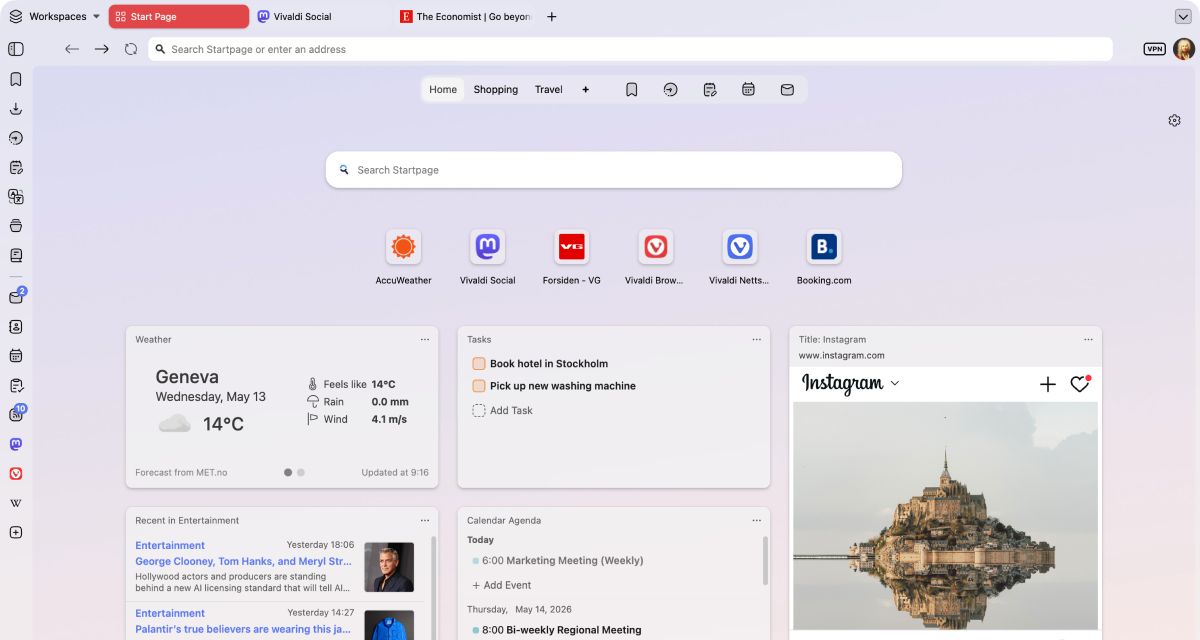
Vivaldi is the most customizable browser in the world! Why is this important to your productivity? Elementary. It means you can make Vivaldi work just the way you need it to.
Everyone uses their browser to get something done: work, studies, shopping, research, or simply for entertainment. Vivaldi is packed with useful features to minimize distractions and help you get the task done, efficiently.
With unrivaled tab management features, a myriad of customizable shortcuts and powerful built-in tools, you’ll be able to get more done, and have fun while doing it.
 완벽 지원
 부분 지원
 미지원
| 기능 |  |  |
|---|---|---|
| Two-level tab groups |  완벽 지원 |  미지원 |
| 탭 그룹 | 완벽 지원 | 완벽 지원 |
| 분할 화면 무제한 탭 | 완벽 지원 | 미지원 |
| 사용자 지정 탭 표시줄 위치 | 완벽 지원 | 완벽 지원 |
| 사용자 지정 주소표시줄 위치 | 완벽 지원 | 미지원 |
| 주기적인 탭 새로고침 | 완벽 지원 | 미지원 |
| 웹사이트를 데스크톱 앱으로 설치 (PWA) | 완벽 지원 | 완벽 지원 |
| 사용자 지정 매크로 | 완벽 지원 | 미지원 |
| 사용자 지정 마우스 제스처 | 완벽 지원 | 미지원 |
| 사용자 지정 키보드 단축키 | 완벽 지원 | 미지원 |
| Pomodoro timer | 완벽 지원 | 미지원 |
| To-do list | 완벽 지원 | 미지원 |
| 브라우저 사이드바 속 사용자 지정 앱 & 사이트 | 완벽 지원 |  부분 지원 |
| 수동 탭 절전 (RAM 절약) | 완벽 지원 | 미지원 |
| 휴식 모드 | 완벽 지원 | 미지원 |
| 내장된 메모 편집기 | 완벽 지원 | 미지원 |
| 내장된 메일 | 완벽 지원 | 미지원 |
| 내쟁된 캘린더 | 완벽 지원 | 미지원 |
| 워크스페이스 | 완벽 지원 | 미지원 |
Vivaldi leads on tab management and productivity — with unique built-in features that make it stand out from the crowd.
개인정보 보호
Most browsers claim to protect your privacy, but their business models often depend on some level of profiling or surveillance.
At Vivaldi, we reject these practices and believe what you do on your browser is your business and nobody else’s. We give you the tools you need to protect yourself from Big Tech’s prying eyes, like a built-in ad and tracker blocker with custom lists, Proton VPN and end-to-end encrypted data sync. With Vivaldi, you’re in control!
완벽 지원
부분 지원
미지원
| 기능 | | |
|---|---|---|
| 내장된 광고 차단기 | 완벽 지원 | 미지원 |
| <em>추적</em> 방지 | 완벽 지원 | 완벽 지원 |
| 사용자 지정 차단 목록 | 완벽 지원 | 미지원 |
| 암호화 키로 안전하게 동기화 | 완벽 지원 | 부분 지원 |
| 추적 & 사용자 행동 분석 없음 | 완벽 지원 | 미지원 |
| Free unlimited VPN | 완벽 지원 | 미지원 |
| European | 완벽 지원 | 미지원 |
| Data stored in Europe | 완벽 지원 | 미지원 |
Private by default: no profiling, no data selling, with built-in tracker & ad blocker and a free VPN provided by Proton.
내장된 기능
At Vivaldi, our goal is to provide you with a browser that has all the built-in functionality you need. Our mantra is “a browser that adapts to you, not the other way around”, and because we all have different needs and likes, that means a browser packed with powerful built-in features.
If what you need somehow isn’t already built into Vivaldi, you can install extensions from the Chrome Web Store (they work great in Vivaldi too!), or come to our Forum and make a feature request. We thrive on user feedback: that’s how we develop and grow, as we have no shareholders or investors pulling our strings.
Vivaldi has features you want, and the features you didn’t know you needed that you won’t be able to live without.
완벽 지원
부분 지원
미지원
| 기능 | | |
|---|---|---|
| 브라우저 내 스크린샷 도구 | 완벽 지원 | 미지원 |
| 안전한 전체 페이지 번역 도구 | 완벽 지원 | 부분 지원 |
| 모든 웹사이트 영상 PIP 지원 | 완벽 지원 | 완벽 지원 |
| 공유 가능한 사용자 지정 테마 | 완벽 지원 | 미지원 |
| 편집 가능한 도구 표시줄 | 완벽 지원 | 완벽 지원 |
| Full Chromium extensions compatibility | 완벽 지원 | 미지원 |
| 사용자 지정 검색 엔진 | 완벽 지원 | 미지원 |
| Page Actions to modify the look of pages | 완벽 지원 | 미지원 |
| Reader mode | 완벽 지원 | 완벽 지원 |
| 내장된 메일 | 완벽 지원 | 미지원 |
| 내쟁된 캘린더 | 완벽 지원 | 미지원 |
| 내장된 피드 리더 | 완벽 지원 | 미지원 |
| 통계가 포함된 시각화 기록 | 완벽 지원 | 미지원 |
| 이미지 정보 도구 | 완벽 지원 | 미지원 |
| 이미지 애니메이션 켜기/끄기 | 완벽 지원 | 미지원 |
| 이미지 로딩 켜기/끄기 | 완벽 지원 | 미지원 |
| Free from AI | 완벽 지원 | 미지원 |
| UI 자동 숨김 | 완벽 지원 | 미지원 |
| Desktop mode on Android | 완벽 지원 | 미지원 |
Mail, Calendar, Feed Reader, Notes and Translate — all built-in, no extensions required.

No AI
Unlike most of our competitors, Vivaldi is free from generative AI features. No summarizing tools, no chatbots, you remain in control. We have taken a stand and have chosen humans over hype.
We will not turn the joy of exploring into inactive spectatorship. Without exploration, the web becomes far less interesting. Our curiosity loses oxygen and the diversity of the web dies.
Jón von Tetzchner - CEO, Vivaldi Technologies
Vivaldi is the haven for people who still want to explore. We will continue building a browser for curious minds, power users, researchers, and anyone who values autonomy.
분할 화면 무제한 탭
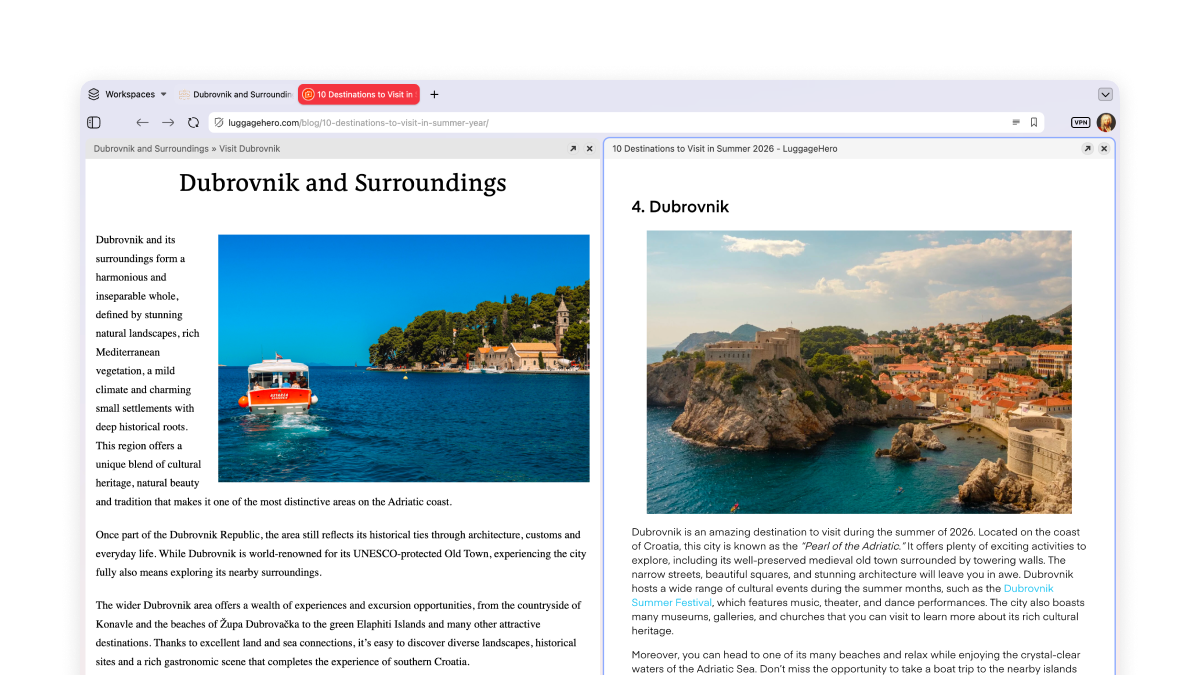
탭 타일 기능을 사용하면 한 번에 두 페이지 이상을 나란히 또는 격자형으로 볼 수 있습니다. 거래를 비교하거나 여러 Twitch 방송을 보는 것과 같이 업무과 여가를 동시에 하기 좋습니다!
Multi-level tab groups
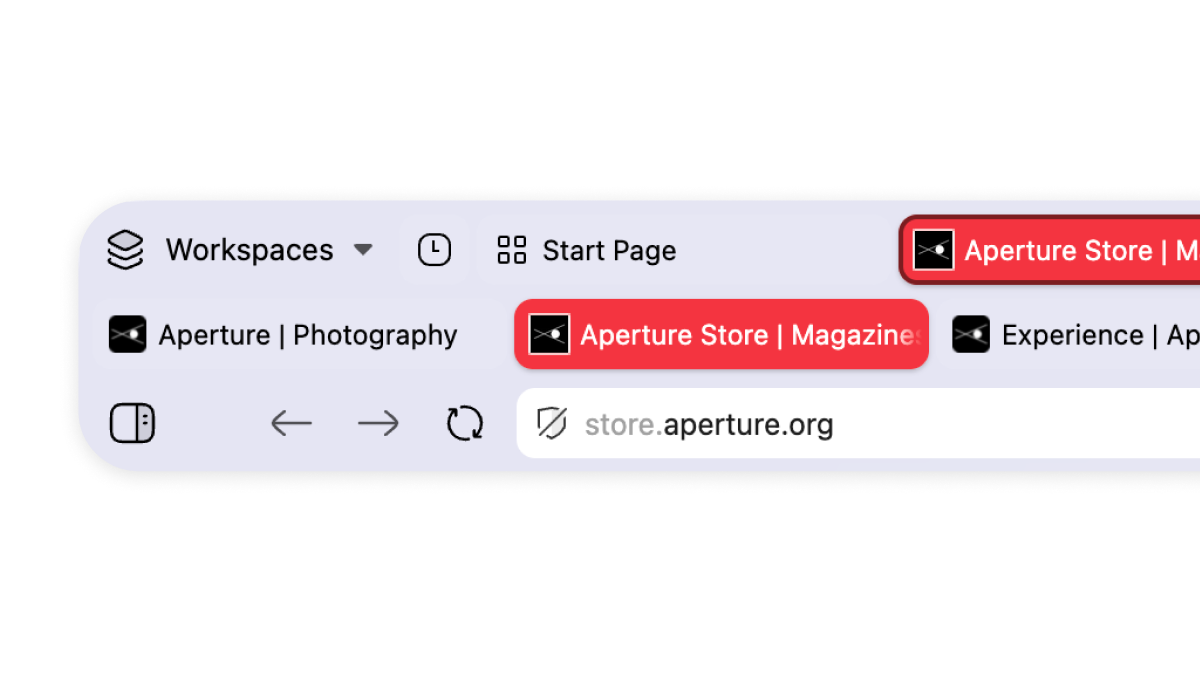
A key example of our unparalleled tab management. Just drag and drop your tabs to organize them in tab groups, which we call stacks. These can be renamed and colour-coded. Your stacks will remain in the main tab bar, and a second level will appear once you click on them, showing you the tabs within that group.
Make your tabs work for you
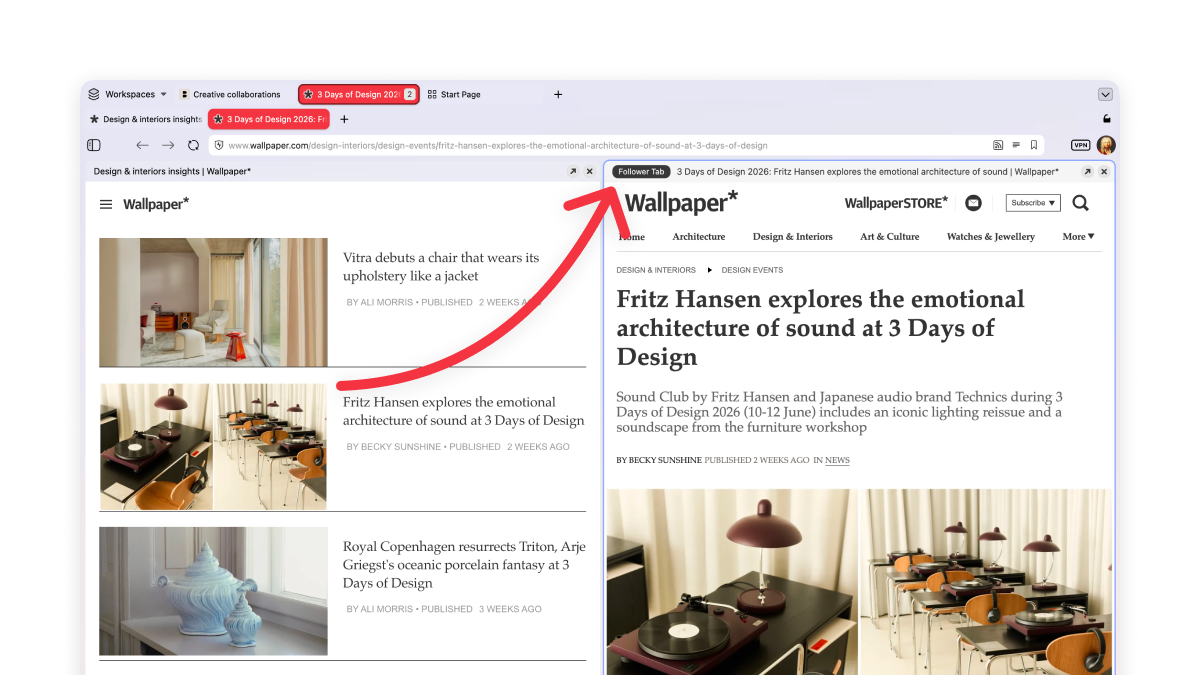
You know the feeling when you’re reading something good, there’s an interesting link, you click it, and twenty minutes later you’ve lost the original thread entirely and have eleven tabs open?
Not in Vivaldi. Our Follower Tab lets you open links in split-screen view, keeping the original page to your left.
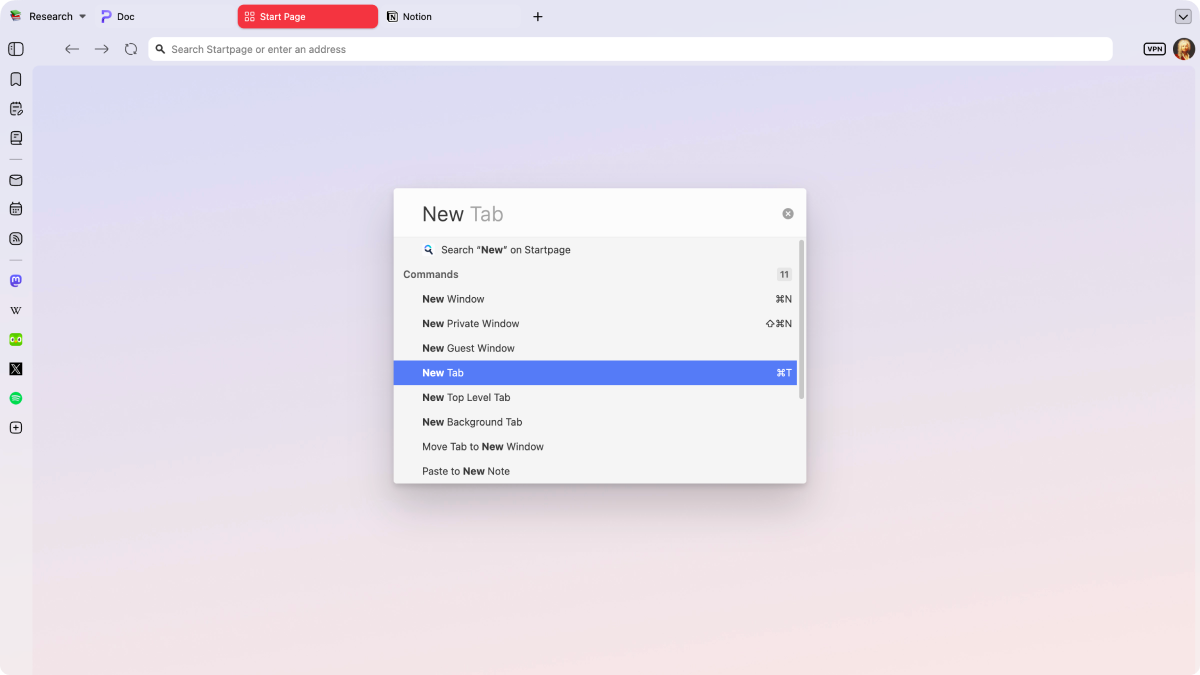
퀵 커맨드로 모든 것을 제어하기
퀵 커맨드는 Vivaldi의 범용 검색 및 제어 센터입니다. 탭, 북마크, 기록 또는 웹을 모두 한곳에서 즉시 검색하고 브라우저 명령을 빠르게 실행하세요.
Frequently asked questions
-
Does Vivaldi support extensions?
Yes. We have a lot of built-in functionality, so you might not need some of the extensions you were used to, but if you do, you can install them from the Chrome Web Store. While Vivaldi and Safari use different extension stores, you’ll find equivalents for the most popular Apple extensions (and many more).
-
Can I import my Safari passwords into Vivaldi?
Yes, you can import your Safari passwords to Vivaldi. Vivaldi can’t read the Keychain directly, so you have to export it manually. You have to export them from Safari’s password settings as a CSV file first, then you can import the CSV into Vivaldi’s password manager.
-
How do passwords work on Vivaldi compared to Safari?
Vivaldi keeps its own separate, encrypted password manager rather than tapping into Apple’s Keychain or Contacts app. This makes Vivaldi’s passwords portable between the different operative systems via Sync.
-
Why won’t Safari let me download the Vivaldi browser?
That’s probably a macOS security prompt. Safari and macOS warn before you open an app downloaded from outside the App Store. Vivaldi is a signed, notarized Mac app, so you can allow the download through Safari (or via System Settings > Privacy & Security) and install it as normal.
Compare Vivaldi with other browsers
Last updated: October 2026