
Vivaldi vs. Microsoft Edge
Many things set Vivaldi and Edge apart, MANY. If we look at the differences between the two companies, there are some core contrasts. Vivaldi is employee-owned, has no external investors, and is based in Europe. Microsoft is one of the main US Big Tech corporations and uses all kinds of dark patterns to dissuade users from switching from Edge.
Vivaldi is free from AI, it does not track you or sell your data, and lets you customize things the way you like. Unlike Edge, whose main goal seems to be “make the web a drab gray place, free of exploration”.
As far apart as the two companies are, let’s take a closer look at the feature differences between these two browsers.
Tuottavuus
Vivaldi is the most customizable browser in the world! Why is this important to your productivity? Elementary. It means you can make Vivaldi work just the way you need it to.
Everyone uses their browser to get something done: work, studies, shopping, research, or simply for entertainment. Vivaldi is packed with useful features to minimize distractions and help you get the task done, efficiently.
With unrivaled tab management features, a myriad of customizable shortcuts and powerful built-in tools, you’ll be able to get more done, and have fun while doing it.
 Täysi tuki
 Osittainen tuki
 Ei tukea
| Ominaisuudet |  |  |
|---|---|---|
| Two-level tab groups |  Täysi tuki |  Ei tukea |
| Välilehtiryhmät | Täysi tuki | Täysi tuki |
| Rajattomasti välilehtiä jaetulla näytöllä | Täysi tuki | Ei tukea |
| Mukautettava välilehtipalkin sijoitus | Täysi tuki |  Osittainen tuki |
| Mukautettava osoitepalkin sijoitus | Täysi tuki | Ei tukea |
| Ajoitettu välilehtien päivitys | Täysi tuki | Ei tukea |
| Asenna sivustoja työpöytäsovelluksina (PWA) | Täysi tuki | Täysi tuki |
| Mukautettavat makrot | Täysi tuki | Ei tukea |
| Mukautettavat hiirieleet | Täysi tuki | Osittainen tuki |
| Mukautettavat pikanäppäimet | Täysi tuki | Ei tukea |
| Pomodoro timer | Täysi tuki | Ei tukea |
| To-do list | Täysi tuki | Ei tukea |
| Omat sovellukset ja sivustot selaimen sivupalkissa | Täysi tuki | Ei tukea |
| Käyttäjän asettama välilehtihorrostus (muistinsäästö) | Täysi tuki | Ei tukea |
| Taukotila | Täysi tuki | Ei tukea |
| Sisäänrakennettu muistio | Täysi tuki | Ei tukea |
| Sisäänrakennettu sähköposti | Täysi tuki | Ei tukea |
| Sisäänrakennettu kalenteri | Täysi tuki | Ei tukea |
| Työtilat | Täysi tuki | Täysi tuki |
Vivaldi leads on tab management and productivity — with unique built-in features that make it stand out from the crowd.
Yksityisyys
Most browsers claim to protect your privacy, but their business models often depend on some level of profiling or surveillance.
At Vivaldi, we reject these practices and believe what you do on your browser is your business and nobody else’s. We give you the tools you need to protect yourself from Big Tech’s prying eyes, like a built-in ad and tracker blocker with custom lists, Proton VPN and end-to-end encrypted data sync. With Vivaldi, you’re in control!
Täysi tuki
Osittainen tuki
Ei tukea
| Ominaisuudet | | |
|---|---|---|
| Sisäänrakennettu mainosesto | Täysi tuki | Ei tukea |
| Suojaus seurannoilta | Täysi tuki | Täysi tuki |
| Omat estolistat | Täysi tuki | Ei tukea |
| Turvallinen synkronointi salausavaimella | Täysi tuki | Osittainen tuki |
| Ei seurantaa ja käyttäjäprofilointia | Täysi tuki | Ei tukea |
| Free unlimited VPN | Täysi tuki | Osittainen tuki |
| European | Täysi tuki | Ei tukea |
| Data stored in Europe | Täysi tuki | Ei tukea |
Private by default: no profiling, no data selling, with built-in tracker & ad blocker and a free VPN provided by Proton.
Sisäänrakennetut ominaisuudet
At Vivaldi, our goal is to provide you with a browser that has all the built-in functionality you need. Our mantra is “a browser that adapts to you, not the other way around”, and because we all have different needs and likes, that means a browser packed with powerful built-in features.
If what you need somehow isn’t already built into Vivaldi, you can install extensions from the Chrome Web Store (they work great in Vivaldi too!), or come to our Forum and make a feature request. We thrive on user feedback: that’s how we develop and grow, as we have no shareholders or investors pulling our strings.
Vivaldi has features you want, and the features you didn’t know you needed that you won’t be able to live without.
Täysi tuki
Osittainen tuki
Ei tukea
| Ominaisuudet | | |
|---|---|---|
| Sisäänrakennettu kuvankaappaustyökalu | Täysi tuki | Täysi tuki |
| Yksityinen kokonaisten sivujen käännöstyökalu | Täysi tuki | Osittainen tuki |
| Videoiden ponnahdustoisto kaikilla sivustoilla | Täysi tuki | Osittainen tuki |
| Mukautettavat ja jaettavat teemat | Täysi tuki | Ei tukea |
| Muokattavat työkalupalkit | Täysi tuki | Osittainen tuki |
| Full Chromium extensions compatibility | Täysi tuki | Täysi tuki |
| Mukautettavat hakukoneet | Täysi tuki | Täysi tuki |
| Page Actions to modify the look of pages | Täysi tuki | Ei tukea |
| Reader mode | Täysi tuki | Täysi tuki |
| Sisäänrakennettu sähköposti | Täysi tuki | Ei tukea |
| Sisäänrakennettu kalenteri | Täysi tuki | Ei tukea |
| Sisäänrakennettu syötelukija | Täysi tuki | Ei tukea |
| Visuaalinen historia tilastoilla | Täysi tuki | Ei tukea |
| Kuvien tietojen tarkastelu | Täysi tuki | Ei tukea |
| Animoitujen kuvien animoinnin ohjaus | Täysi tuki | Ei tukea |
| Kuvien latautumisen hallinta | Täysi tuki | Täysi tuki |
| Free from AI | Täysi tuki | Ei tukea |
| Käyttöliittymän automaattipiilotus | Täysi tuki | Ei tukea |
| Desktop mode on Android | Täysi tuki | Osittainen tuki |
Mail, Calendar, Feed Reader, Notes and Translate — all built-in, no extensions required.

No AI
Unlike most of our competitors, Vivaldi is free from generative AI features. No summarizing tools, no chatbots, you remain in control. We have taken a stand and have chosen humans over hype.
We will not turn the joy of exploring into inactive spectatorship. Without exploration, the web becomes far less interesting. Our curiosity loses oxygen and the diversity of the web dies.
Jón von Tetzchner - Toimitusjohtaja, Vivaldi Technologies
Vivaldi is the haven for people who still want to explore. We will continue building a browser for curious minds, power users, researchers, and anyone who values autonomy.
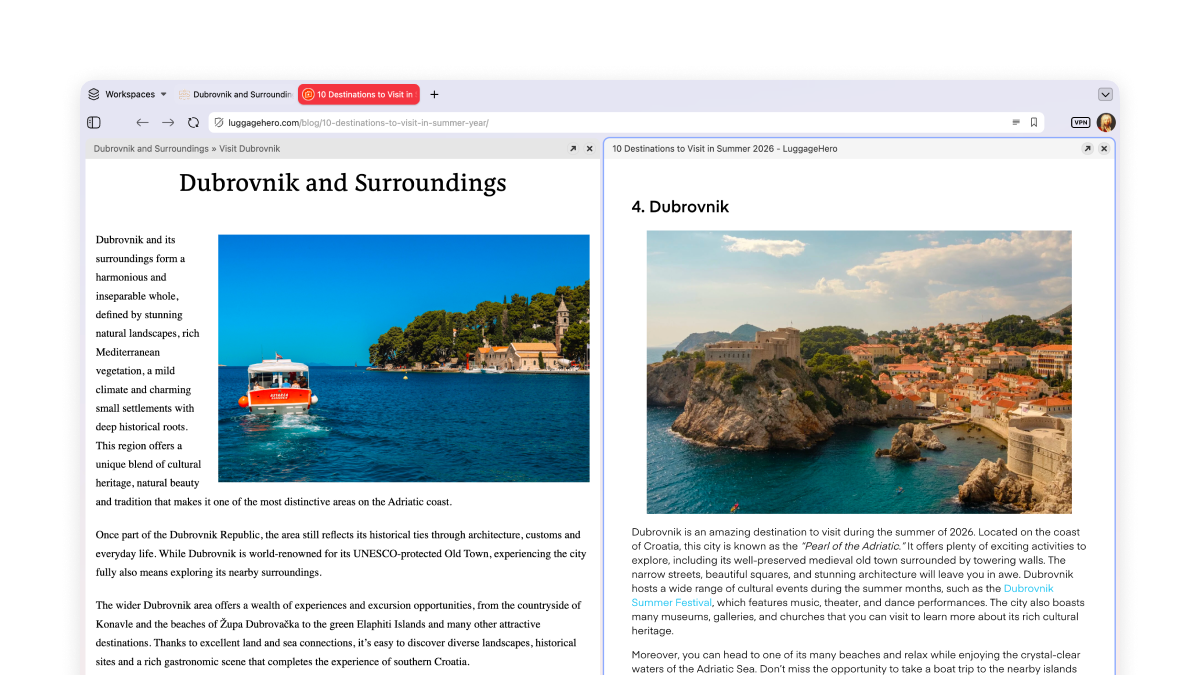
Rajattomasti välilehtiä jaetulla näytöllä
Välilehtien asettelun avulla voit näyttää useita sivuja saman aikaisesti vierekkäin tai ruudukkona. Työhön ja huviin — vertaile vaikka hintoja tai seuraa useita Twitch-lähetyksiä!
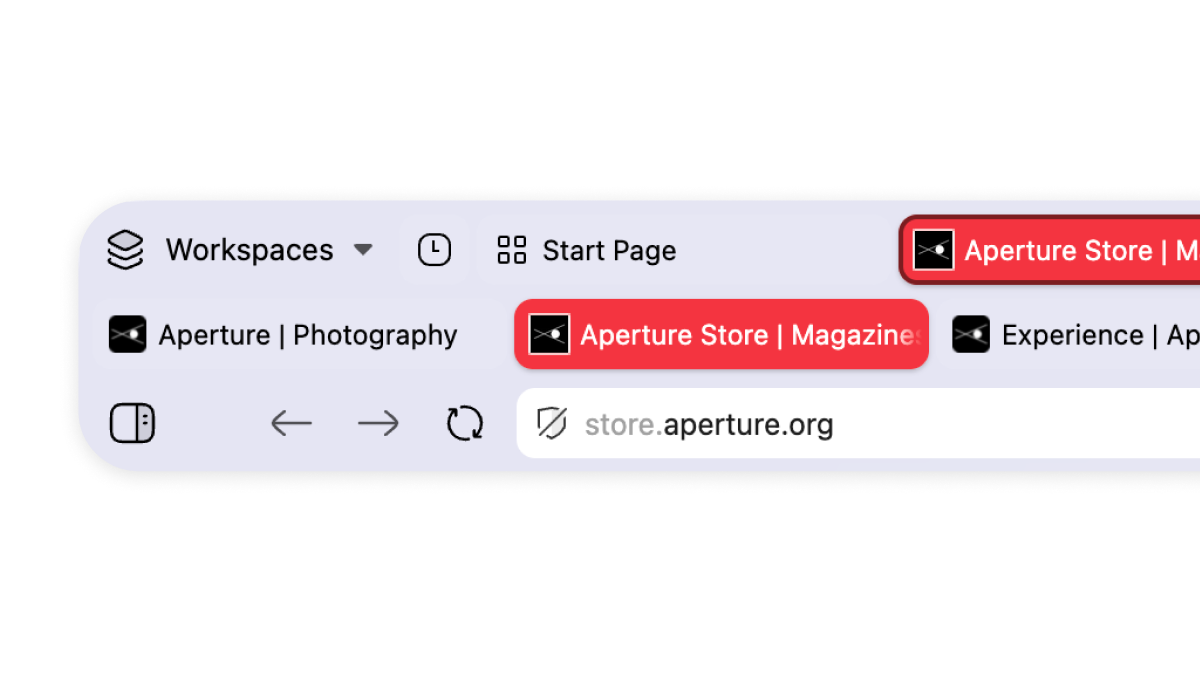
Multi-level tab groups
A key example of our unparalleled tab management. Just drag and drop your tabs to organize them in tab groups, which we call stacks. These can be renamed and colour-coded. Your stacks will remain in the main tab bar, and a second level will appear once you click on them, showing you the tabs within that group.
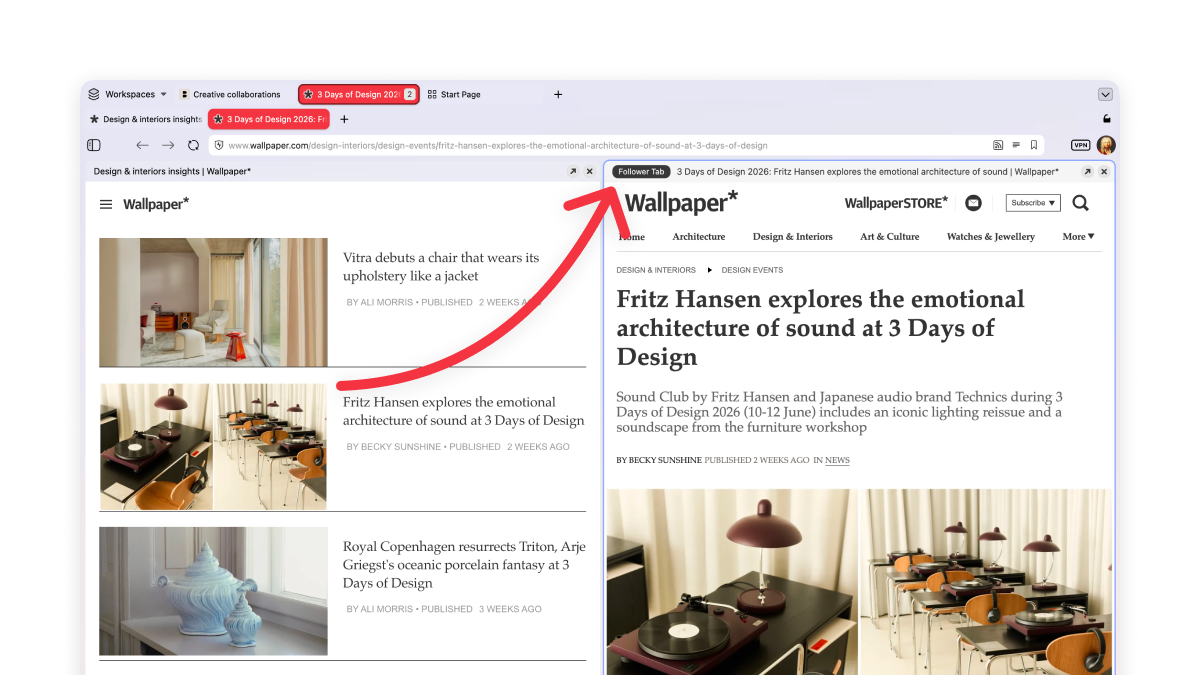
Make your tabs work for you
You know the feeling when you’re reading something good, there’s an interesting link, you click it, and twenty minutes later you’ve lost the original thread entirely and have eleven tabs open?
Not in Vivaldi. Our Follower Tab lets you open links in split-screen view, keeping the original page to your left.
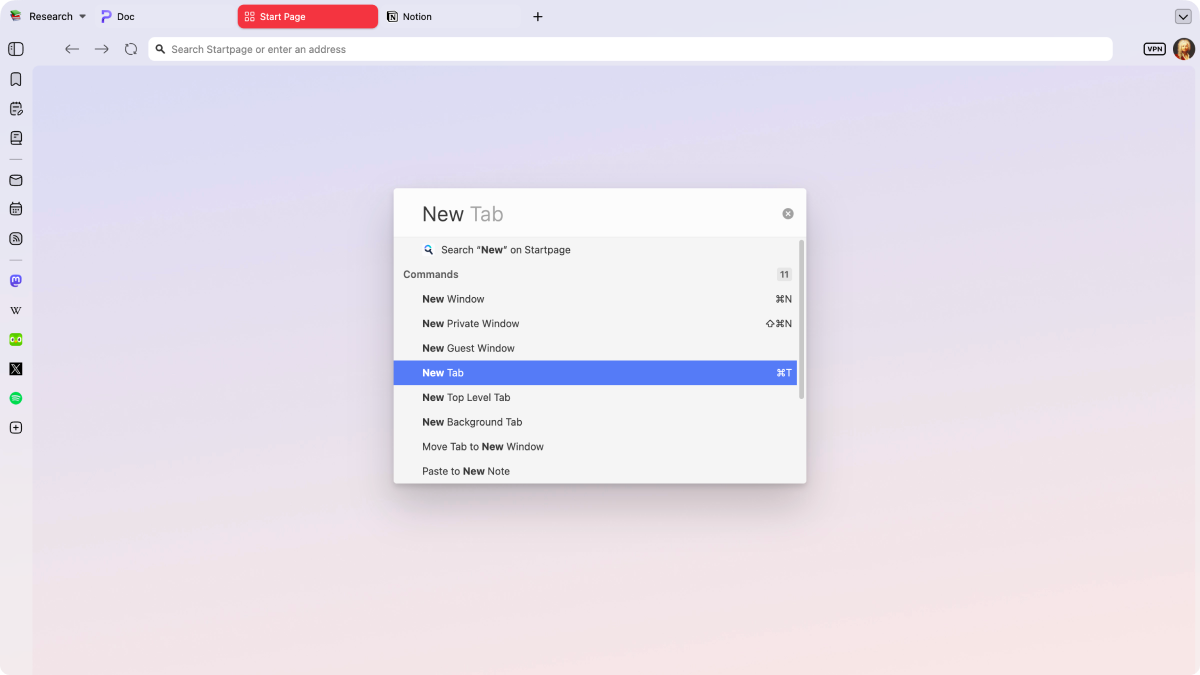
Hallitse kaikkea pikakomennoin
Pikakomennot ovat Vivaldi yleishaku ja ohjauskeskus. Etsi välilehtiä, kirjanmerkkejä, historiaa tai verkkoa välittömästi ja suorita selainkomentoja yhdestä paikasta.
Frequently asked questions
-
Can I use my Microsoft Edge extensions in Vivaldi?
Yes, Vivaldi runs on the same Chromium engine as Microsoft Edge, so most Edge extensions work in Vivaldi. You can find all your favourite extensions in the Chrome Web Store.
-
Can I transfer my Microsoft Edge history, bookmarks and passwords to Vivaldi?
Yes, you can bring your bookmarks, history, and passwords over from Edge. During Vivaldi’s setup process you will be prompted to choose your previous browser to import your data quickly and safely.
-
Why does my default browser keep reverting back to Microsoft Edge?
That’s unfortunately not under our control. Microsoft wires Edge deep into the OS as the default browser, tied to Microsoft 365. A Windows update or certain system links can quietly reset your default back to Edge. If that happens, you may need to reselect Vivaldi in Settings > Apps > Default apps.
-
Is Vivaldi more private than Microsoft Edge?
Yes. Vivaldi has a built-in ad and tracker blocker with support for custom lists. We believe what you do with your browser is not our business, so we do not track or profile you. Vivaldi also stores your encrypted data on our own servers located in Iceland, and is therefore bound by European GDPR law.
-
Does Vivaldi have Copilot or AI features like Microsoft Edge?
No. Despite the pressure from the tech industry, we have rejected the idea of adding AI from the beginning. We have chosen a human-first approach and will not have any chatbots or AI summarization tool. Edge, by contrast, has Copilot built-in as a core feature.
Compare Vivaldi with other browsers
Last updated: October 2026